Gateway Config Options

Format is as follows:

Name, ID, Length, Signed?

Options:

Value in decimal = Meaning


VIN id=0 len=17 ?

Unique to each car.

carcomputer_pn id=1 len=12 ?

Options: (the PCB variants)

1566786-80-C = HW 3.2

1462554-00-H = HW 3

1098058-00-K = HW 2.5

carcomputer_sn id=2 len=14 ?

Unique to each car.

infotainmentpcba_pn id=3 len=12 ?

Options:

1756000-12-F = HW 3.2

1479302-02-G = HW 3

1133171-00-F = HW 2.5

infotainmentpcba_sn id=4 len=14 ?

Unique to each car.

birthday id=5 len=4 ?

Unique to each car; in epoch time.

country id=6 len=2 Yes

Options:

21843=USA

Others unknown

exteriorColor id=7 len=1 No

Options:

0 = RED_MULTICOAT

1 = SOLID_BLACK

2 = SILVER_METALLIC

3 = MIDNIGHT_SILVER

4 = ??

5 = DEEP_BLUE

6 = PEARL_WHITE

drivetrainType id=8 len=1 No

Options:

0 = RWD

1 = AWD

2 = AWD_DUAL_REAR

airSuspension id=9 len=1 No

Options:

0 = None

1 = TESLA_STANDARD

2 = TESLA_ADAPTIVE

epasType id=10 len=1 ?

Options:

0 = MANDO_VGR69_GEN3

1 = MANDO_VGR66_GEN3

heatedWipers id=11 len=1 No

Options:

0 = false?

frontSeatHeaters id=12 len=1 No

Options:

0 = NONE

1 = KONGSBERG_LOW_POWER

rearSeatHeaters id=13 len=1 No

Options:

0 = NONE

1 = KONGSBERG_LOW_POWER

packEnergy id=14 len=1 No

Options:

0 = PACK_50_KWH

1 = PACK_74_KWH

2 = PACK_62_KWH

3 = PACK_100_KWH

4 = PACK_75_KWH

devSecurityLevel id=15 len=1 No

Options: (Gateway debug security level for DEV-configured cars)

0 = ?

1 = ?

2 = LC_FACTORY (Factory security level; must match MPC5748G HW value CUST_DEL)

3 = LC_GATED (Post-gate security level; must match MPC5748G HW value OEM_PROD)

restraintsHardwareType id=16 len=1 No

Options:

21 = NA_M3

22 = EUROW_ECALL_M3

23 = EUROW_NO_ECALL_M3

31 = NA_MY_RC1

32 = NA_MY

33 = EUROW_ECALL_MY

34 = EUROW_NO_ECALL_MY

121 = NA_M3_OH

122 = EUROW_ECALL_M3_OH

123 = ROW_NO_ECALL_M3_OH

171 = NA_MSP2

174 = NA_MSP2_YOKE

brakeHWType id=17 len=1 No

Options:

0 = BREMBO_P42_MANDO_43MOC (M3 Base)

1 = BREMBO_LARGE_P42_BREMBO_44MOC (M3 Performance)

2 = BREMBO_LARGE_P42_MANDO_43MOC (MY Base)

3 = BREMBO_LARGE_P42_BREMBO_LARGE_44MOC (MY P)

4 = BREMBO2_42_44_D380_MANDO1_43_D365 (MS)

4 = BREMBO2_42_44_D395_MANDO1_43_D365 (MX)

homelinkType id=18 len=1 No

Options:

0 = NONE

1 = HOMELINK_V_OPT_2

rightHandDrive id=19 len=1 No

Options:

0 = LEFT

1 = RIGHT

roofType id=20 len=1 No

Options:

0 = METAL

1 = FIXED_GLASS

2 = PANORAMIC

vdcType id=21 len=1 No

Options:

0 = BOSCH_VDC

1 = TESLA_VDC

xcpIbst id=22 len=1 No

Options: (Experimental IBST)

0 = FALSE

1 = TRUE

xcpESP id=23 len=1 No

Options: (Experimental ESP)

0 = FALSE

1 = TRUE

memoryMirrors id=24, len=1 No

Options:

0 = NOT_INSTALLED

1 = SMR

powerSteeringColumn id=25, len=1 No

Options:

0 = NOT_INSTALLED

1 = TK

InteriorLighting id=26, len=1 No

Options:

0 = BASE

1 = PREMIUM

2 = PREMIUM_NO_POCKET_LIGHT

frontFogLamps id=27, len=1 No

Options:

0 = NOT_INSTALLED

1 = INSTALLED

headlamps id=28, len=1 No

Options:

0 = BASE

1 = PREMIUM

2 = GLOBAL

autopilot id=29, len=1 Yes

Options:

0 = NONE

1 = HIGHWAY

2 = ENHANCED

3 = SELF_DRIVING

4 = BASIC

superchargingAccess id=30, len=1 Yes

Options:

0 = ALLOWED

1 = NOT_ALLOWED

2 = PAY_AS_YOU_GO

audioType id=31, len=1 No

Options:

0 = BASE

1 = PREMIUM

2 = BASE_WITH_PREMIUM200

LumbarECUType id=32, len=1 No

Options:

0 = NONE

1 = ALFMEIER

2 = New cars which are missing passenger lumbar support

ecuMapVersion id=33, len=1 No

Options:

0 = BASE_VERSION

ibstWakeType id=34 len=1 No

Options:

1 = ? (July 2018 M3)

numberHVILNodes id=35 len=1 No

Options:

0 = HVIL_NODES_0

1 = HVIL_NODES_1

2 = HVIL_NODES_2 (Default)

3 = HVIL_NODES_3

4 = HVIL_NODES_4

5 = HVIL_NODES_5

frontSeatType id=36 len=1 No

Options:

0 = BASE_TESLA

1 = PREMIUM_TESLA

2 = PREMIUM_L_YANFENG_R_TESLA

3 = PREMIUM_L_TESLA_R_YANFENG

4 = PREMIUM_YANFENG

prodCodeKey id=37 len=29 Yes

Signing key?

F0 F3 4D D3 B9 19 78 30 02 50 B1 87 56 0B F6 8C DF 40 A5 08 31 16 27 93 10 E8 40 03 53 4B 37 96

prodCmdKey id=38 len=29 Yes

Signing key?

5F 8C F2 C7 92 AC CE 3F 82 1C 87 EC 9D 30 3C 18 F7 BC DC C9 20 E4 08 5E A2 C8 4B C1 D7 28 6E 67

altCodeKey id=39 len=32 Yes

Usually blank; do not think this is used in prod.

altCmdKey id=40 len=32 Yes

Usually blank; do not think this is used in prod.

wheelType id=41 len=1 No

Options:

0 = PINWHEEL_18

1 = STILETTO_19

2 = STILETTO_20

3 = STILETTO_20_DARK_STAGGERED

4 = GEMINI_19_SQUARE

5 = GEMINI_19_STAGGERED

?

14 = STILETTO_20_DARK_SQUARE

15 = INDUCTION_20_BLACK

16 = UBERTURBINE_21_BLACK

17 = APOLLO_19_SILVER

18 = PINWHEEL_18_CAP_KIT

19 = ZEROG_20_GUNPOWDER

20 = APOLLO_19_SILVER_CAP_KIT

21 = STILETTO_REFRESH_19

22 = PINWHEEL_REFRESH_18

23 = UBERTURBINE_20_GUNPOWDER

24 = PINWHEEL_REFRESH_18_CAP_KIT

25 = CARDENIO_19

26 = ??

27 = ZEROG_19_GUNPOWDER

28 = ??

29 = ARACHNID_21

iceUpdaterBuckConfig id=42 len=16 No

Options:

‘’ = No config? (July 2018 M3)

auxParkLamps id=43 len=1 No

Options:

0 = NA_BASE

1 = NA_PREMIUM

2 = EU

3 = NONE

pedestrianWarningSound id=44 len=1 No

Options:

0 = NONE

1 = SPEAKER

hvacQuietSnorkelType id=45 len=1 No

Options:

0 =? (July 2018 M3)

hvacPanelVaneType id=46 len=1 No

Options:

0 = PARALLEL_V1

1 = CONVERGENT_V1

CabinBlowerCtrlType id=47 len=1 No

Options:

0 =? (July 2018 M3)

performancePackage id=48 len=1 Yes

Options:

0 = BASE

1 = PERFORMANCE

2 = ?

3 = BASE_PLUS (SR+ and LR with acceleration boost)

eBuckConfig id=49 len=1 No

Options:

0 = NONE

1 = DEV_BUCK

windshieldType id=50 len=1 No

Options:

0 =? (July 2018 M3)

activeHighBeam id=51 len=1 No

Options:

0 = NOT_ACTIVE

1 = ACTIVE

airbagCutoffSwitch id=52 len=1 No

Options:

0 = CUTOFF_SWITCH_DISABLED

1 = CUTOFF_SWITCH_ENABLED

iIntrusionSensorType id=53 len=1 No

Options:

0 = NOT_INSTALLED

1 = VODAFONE

autopilotTrialExpireTime id=54 len=4 Yes

Options: (UTC time when autopilot trial will expire)

0 = INACTIVE

4294967295 = EXPIRED

spoilerType id=55 len=1 No

Options:

0 = NOT_INSTALLED

1 = PASSIVE

rearGlassType id=56 len=1 No

Options:

0 = NX

1 = TSA5_NOPET

gatewayApplicationConfig id=57 len=16 No

Options:

‘’ = No config? (July 2018 M3)

rearFogLamps id=58 len=1 No

Options:

0 = NOT_INSTALLED

1 = INSTALLED

dasHw id=59 len=1 No

Options:

0 = ?

1 = ?

2 = ?

3 = PARKER_PASCAL_2_5

4 = TESLA_AP3

securityVersion id=60 len=4 ?

3 = (July 2018 M3 in October 2018; also analytic’s main bench)

bmpWatchdogDisabled id=61 len=1 No

Options: (Disabled by default in factory mode)

0 = ENABLED

1 = DISABLED

tireType id=62 len=1 No

Options:

0 = UNKNOWN

1 = MICHELIN_ALL_SEASON_18

2 = MICHELIN_SUMMER_18

3 = HANKOOK_SUMMER_19

4 = CONTI_ALL_SEASON_19

5 = MICHELIN_SUMMER_20

?

17 = GOODYEAR_ALL_SEASON_20

18 = PIRELLI_SUMMER_21

19 = MICHELIN_ALL_SEASON_21

20 = PIRELLI_SUMMER_19

21 = PIRELLI_SUMMER_20

22 = MICHELIN_SUMMER_21

roofGlassType id=63 len=1 No

Options:

0 = TSA3_PET

1 = TSA5_NOPET

trackModePackage id=64 len=1 Yes

Options:

0 = NONE

1 = PERFORMANCE

2 = ENABLED_UI_SOS

eCallEnabled id=65 len=1 ?

Options:

0 = not enabled

?

mapRegion id=66 len=1 No

Options:

0 = US

1 = EU

2 = NONE

3 = CN

4 = AU

5 = JP

6 = TW

7 = KR

8 = ME

9 = HK

10 = MO

rearLightType id=67 len=1 No

Options:

0 = Default through 2021

rearDriveUnitType id=68 len=1 No

Options:

0 = ?? (From 2019 bench with VIN of 0, not delivered)

chassisType id=69 len=1 No

Options: “00”: “ModelS”,

“01”: “ModelX”,

“02”: “Model3”,

“03”: “ModelY”

“04”: “SemiTruck”

plcSupportType id=70 len=1 No

Options:

0 = NONE

1 = ONBOARD_ADAPTER

2 = NATIVE_CHARGE_PORT

?????? id=71 ? Yes

Options:

Empty on analytic’s bench

towPackage id=72 len=1 No

Options:

0 = NONE

1 = TESLA_REV1

refrigerantType id=73 len=1 No

Options:

2 = Default through 2021

passengerOccupancySensorType id=74 len=1 No

Options:

0 = OCS

1 = RESISTIVE_PAD

2 = IEE_OCS

connectivityPackage id=75 len=1 Yes

Options:

0 = BASE

1 = PREMIUM

tpmsType id=76 len=1 No

Options:

0 = CONTI_2

1 = TESLA_BLE

frontSeatReclinerHardware id=77 len=1 No

Options:

0 = STANDARD_RANGE

1 = RIGHT_SEAT_REDUCED_RANGE

2 = LEFT_SEAT_REDUCED_RANGE

3 = LEFT_RIGHT_SEAT_REDUCED_RANGE

espValveType id=78 len=1 No

Options:

2 = Default through 2021

softRange id=79 len=1 Yes

Options:

0 = false

immersiveAudio id=80 len=1 Yes

Options:

1 = true (2019)

2 = true (2021 car)

deliveryStatus id=81 len=1 Yes

Options:

0 = Not Delivered

1 = Delivered

?????? id=82 ? Yes

Options:

Empty on analytic’s bench

loggingVersion id=83 len = 1 No

Options:

1 = Default

compressorType id=84 len=1 ???

Options:

0 = HANON_33CC

1 = DENSO_41CC_8K

2 = DENSO_41CC_11K

3 = SANDEN

4 = DENSO_11K_COP1_ENABLED

5 = SANDEN_V2

cabinPTCHeaterType id=85 len=1 ???

Options:

0 = BORGWARNER

1 = NONE

coolantPumpType id=86 len=1 No

Options:

0 = Default through 2021

autopilotTrial id=87 len=5 Yes

Options:

‘’ = None

autopilotSubscription id=88 len=5 Yes

Options:

‘’ = None

autopilotCameraType id=89 len=1 No

Options:

0 = ?? (HW3.2 value)

accelPedalRouting id=90 len=1 Yes

Options:

0 = ?? (From 2019 bench with VIN of 0, not delivered)

passengerAirbagType id=91 len=1 No

Options:

0 = FULL_SUPPRESSION

1 = SAFETY_VENT

2 = EUROW

headlightLevelerType id=92 len=1 No

Options:

0 = NONE

1 = GEN1

2 = VIRTUAL_PITCH_SENSOR

efficiencyPackage id=93 len=1 No

Options:

0 = ? (April 2019 M3)

4 = ? (May 2021 M3)

bPillarNFCParam id=94 len=1 No

Options:

0 = ? Default through 2021

steeringColumnUJointType id=95 len=1 No

Options:

1 = ? Default through 2021

twelveVBatteryType id=96 len=1 No

Options:

0 = ATLASBX_B24_FLOODED

1 = CLARIOS_B24_FLOODED

2 = ?

3 = MODELS_BACKER_THIN_3M

4 = MODELX_BACKER_THIN_3M

radarHeaterType id=97 len=1 No

Options:

0 = NONE

1 = BECKER_THIN_3M

2 = ?

3 = MODELS_BACKER_THIN_3M

4 = MODELX_BACKER_THIN_3M

parkAssistECUType id=98 len=1 ???

Options:

0 = ? Default through 2021

powerLiftgateType id=99 len=1 ???

Options:

0 = NOT_INSTALLED

1 = TESLA_REV1

m3FrontOverheadConsoleType id=100 len=1 ?

Options:

0 = ? Default through 2021

packMassDeviation id=101 len=1 ?

Options:

0 = ? Default through 2021

brakeLineSwitchType id=102 len=1 ?

Options:

0 = ? (April 2019 M3)

1 = ? (May 2021 M3)

blowerMotorType id=103 len=1 ?

Options:

0 = ? Default through 2021

steeringColumnMotorType id=104 len=1 ?

Options:

0 = BOSCH

1 = JE

wirelessPhoneChargerType id=105 len=1 ?

Options:

0 = NONE_OR_USB

1 = FRONT_LIN

2 = FRONT_AND_REAR_LIN

interiorTrimType id=106 len=1 ?

Options:

0 = BLACK

1 = WHITE

2 = BLACK_CONSOLE_2

3 = WHITE_CONSOLE_2

4 = CREAM

mcuBootData id=107 ? ?

Options:

?

exteriorTrimType id=108 len=1 ?

Options: (UNCONFIRMED)

0 = Chrome trim

1 = Black trim

eCallAntennaHW id=109 len=1 ?

Options:

1 = ? (2019 – 2021 USA M3, none?)

forwardRadarHw id=110 len=1 ?

Options:

0 = Continental Radar

1 = ?

2 = NONE (New vision cars)

inakeAirFilterType id=111 ? No

Options: (Model Y Only; M3 gtw3 firmware does not support this)

0 = STANDARD

1 = HEPA

secondRowSeatType id=112 ? ?

Options:

? (Model Y Only; M3 gtw3 firmware does not support this)

thirdRowSeatType id=113 ? ?

Options:

? (Model Y Only; M3 gtw3 firmware does not support this)

steeringHeaterType id=114 len=1 ?

Options:

0 = Not Present

1 = Present

steeringHeaterEnabled id=115 len=1 ?

Options:

0 = false

1 = true

gloveboxUSBType id=116 len=1 ?

Options:

0 = Older cars without glovebox USB

1 = Glovebox USB present

ethernetTunerType id=117 len=1 ?

Options:

0 = HARMAN

1 = NONE

superManifoldType id=118 len=1 ?

Options:

0 = ? Default through 2021

gloveboxActuatorType id=119 len=1 ?

Options:

0 = ? Default through 2021

ibstHardwareType id=120 len=1 ?

Options:

0 = ? (April 2019 M3)

1 = ? (May 2021 M3)

?????? id=121 len=? ?

Options:

?

interiorCameraType id=122 len=1 ?

Options:

0 = Model 3

1 = Model S? (Unconfirmed) (Changing to this on M3 does nothing)

windshieldWiperHeaterType id=125 len=1 ?

Options:

0 = NONE – Default on May 2021 Model 3

interiorCabinRadarType id=127 len=1 ?

Options:

0 = NONE – Default on May 2021 Model 3

epblHwType id=128 len=1 ?

Options:

0 = Default on 2021 Model 3

epbrHwType id=129 len=1 ?

Options:

0 = Default on 2021 Model 3

ptcSequentialRodControl id=130 len=1 ?

Options:

0 = DISABLED

1 = ENABLED

131 & 132 unknown

frontUsbHubType id=133 len=1 ?

Options:

0 = USB_2 (May 2021 M3)

4 = USB_NO_DATA

134 & 135 unknown

interiorCamFanType id=136 len=1 ?

Options:

0 = May 2021 M3

137 unknown

sirenType id=138 len=1 ?

Options:

1 = May 2021 M3

badgingVersion id=139 len=1 ?

Options:

0 = May 2021 M3

hornType id=140 len=1 ?

Options:

0 = May 2021 M3

refrigACLineType id=145, len=1 ?

Options:

0 = May 2021 M3

refrigFilterType id=146, len=1 ?

Options:

0 = May 2021 M3


_Some potential id names from internal_option_defaults.tsv. All have default values of 0 except espInterface. Could these match any of the unknown ones?

_

4wd

airQualitySensorType

auxHVACType

bodyControlsType

efuseType

espInterface (default of 1)

euvehicle

exvType

frontDoorActuatorType

frontDoorLatchType

frontDriveUnitType

incarTempSensorType

mcuFPGAVersion

modeValveType

parkAssistInstalled

powerLiftgateLatchType

radarPosition

radiatorBypassValveType

rearOilPumpType

restraintControlsType

seatType

shutterType

standbySupplyRequired

steeringColumnHarness

steeringWheel

temperatureHumiditySensor

thBusInstalled

tractionControlType

Published
Categorized as Analysis

Touchpoints

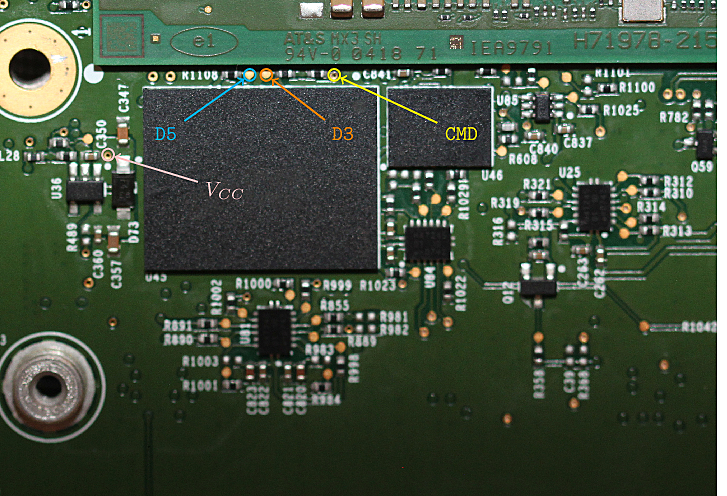
MCU eMMC Touchpoints

eMMC Touchpoints
back
Some touchpoints on the rear

Need to use 1-bit SPI and prevent CPU from utilizing the EMMC. Not easy; though shorting CPU CLK seems like the most viable option.

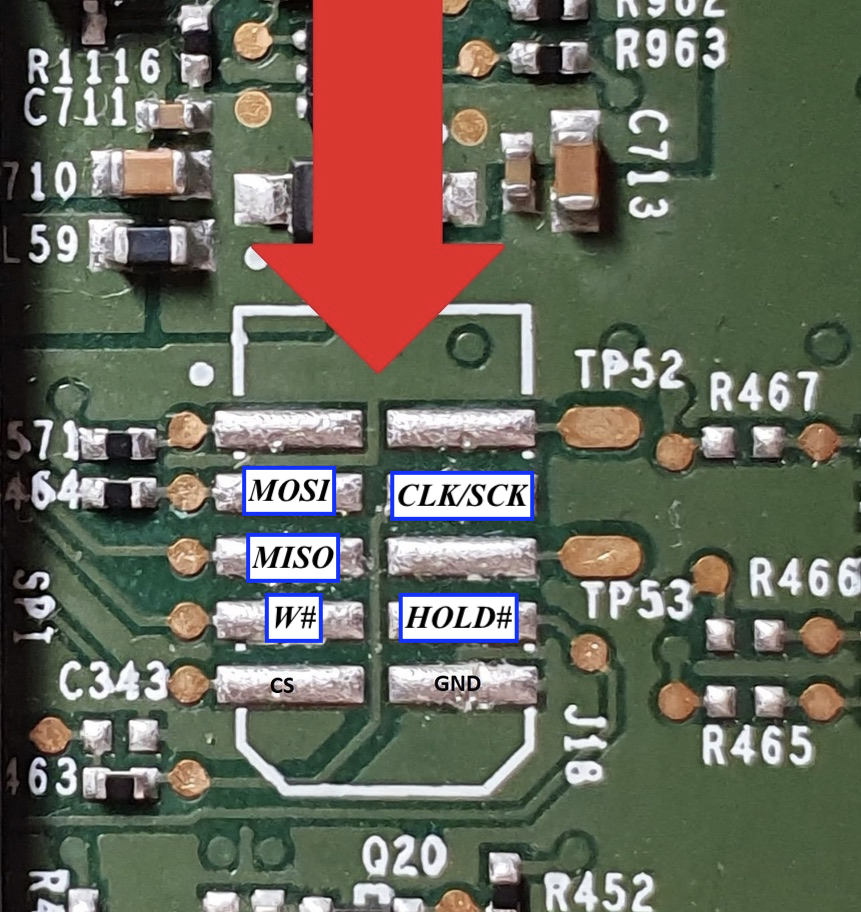
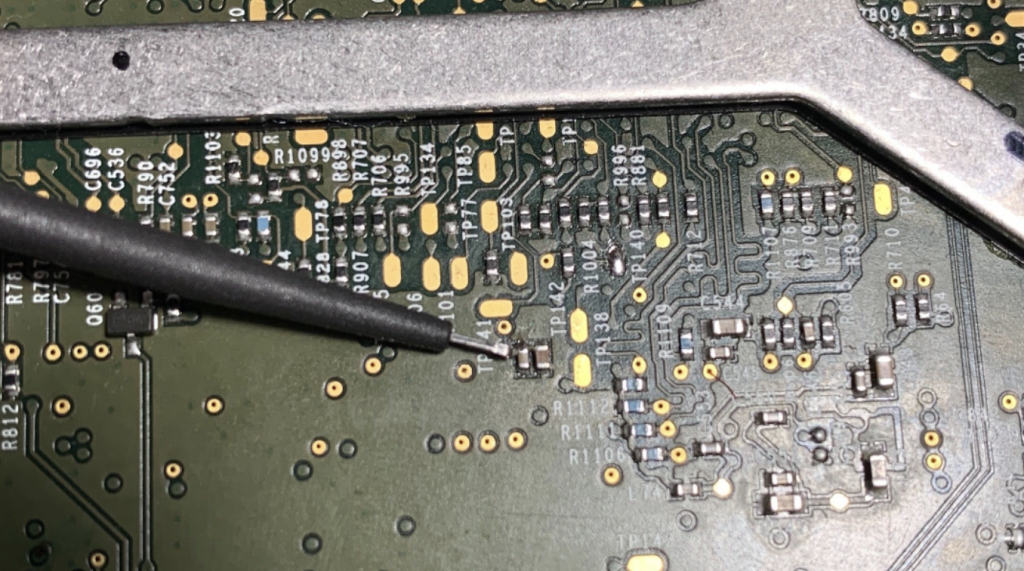
MCU SPI Flash Touchpoints

To dump this, you need to short the BMP RESET button header (or hold down the button), then power on the unit via the normal method. After a few seconds you will be able to read and write successfully.

Some board have headers if you’re lucky.

Attempting to dump the SPI while the unit is powered off but you provide voltage leads to many 0s in the start of the dump when reading; and failures in writing leading to the SPI only containing 0s. This is likely due to the SPI being read; thus why we must short the BMP RESET button.

We need to provide 1.8v to this point. 1.9v may be needed due to voltage drop across components.
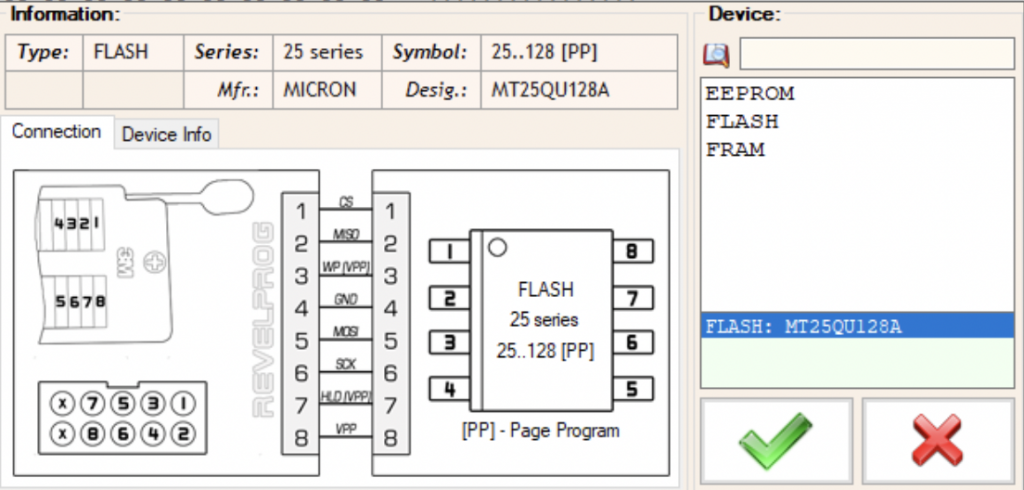
Revelprog settings. Use 200mA overload protection as well, 50% write speed//clock frequency.

APE3 SPI Flash Touchpoints

There is a RESET button to the side of one of the SPI chips. I shorted this button and did not provide power to the unit normally when dumping the SPI successfully for both ape-a and ape-b.

Ask for ape3 Touchpoints – I did not contribute to finding them so I have some reservations sharing.

Tuner Connector Information

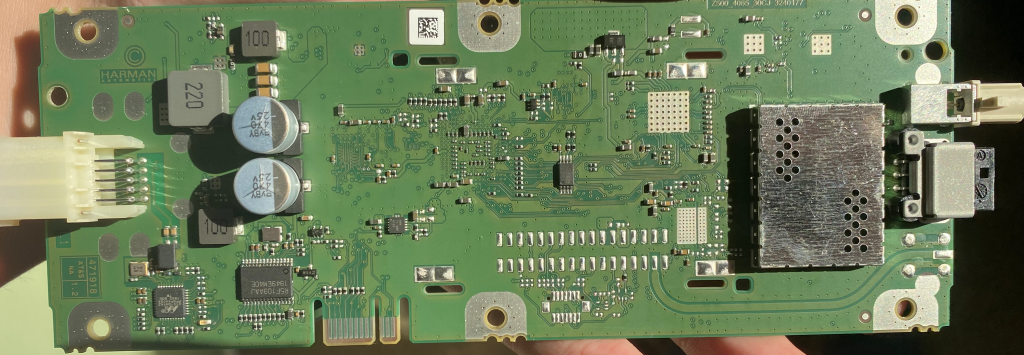
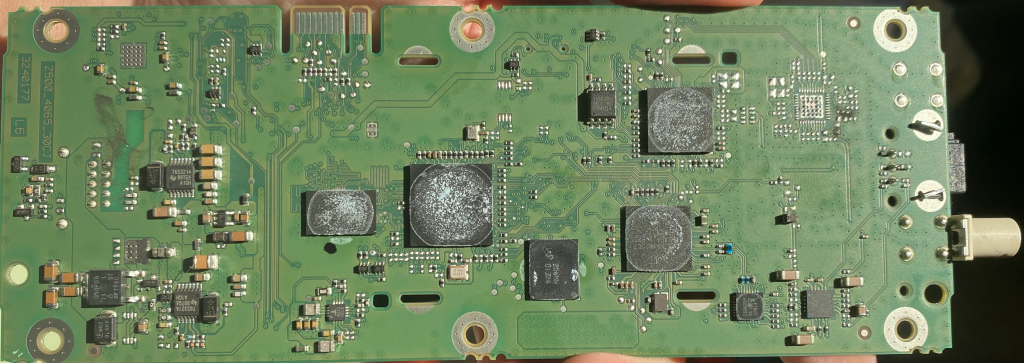
PCB Photos

Top
Bottom

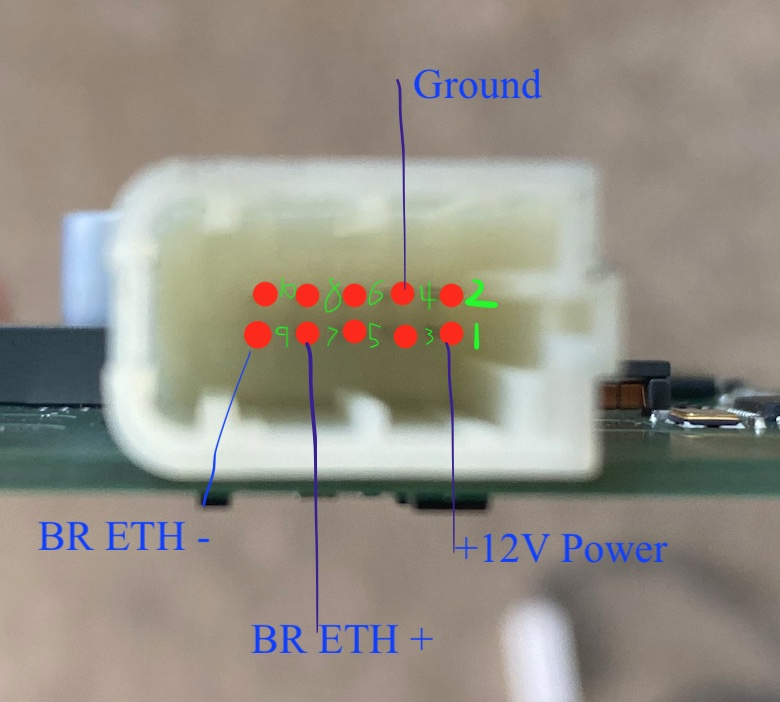
Main Connector

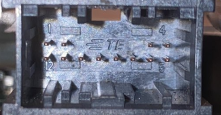
This is connector X562

Part is TE 2302475-2

Pin 1 is + Power In
Pin 4 is Ground
Pin 7 is BR ETH +
Pin 9 is BR ETH -

You can apply power to the +12V pin and ground to the case.

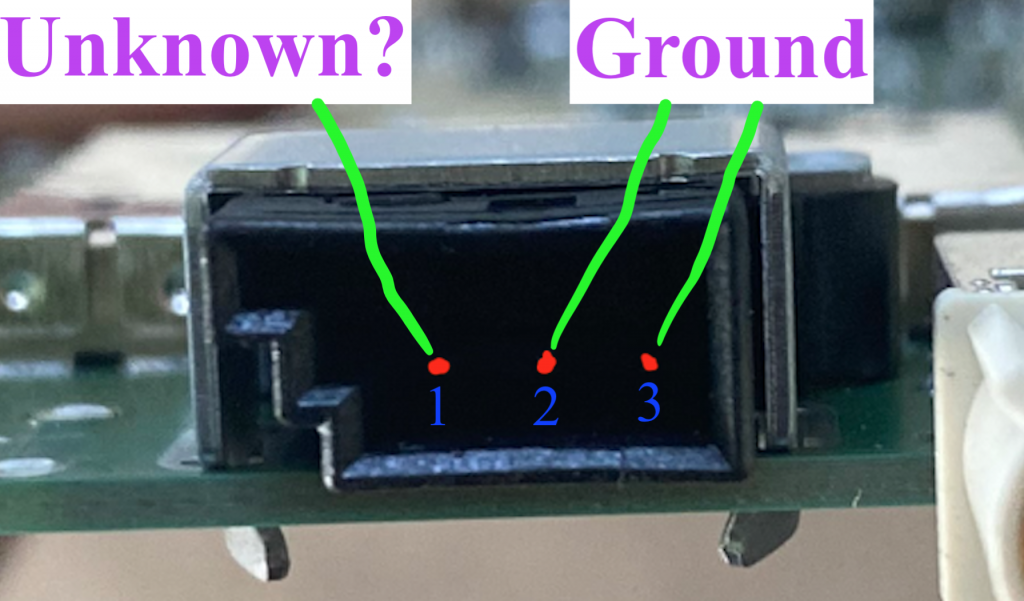
Unused Black Connector

X815 is the black connector on the other side of the tuner.

The connector part number is Unknown

This connector is not used in production.

Pin 1 is Unknown
Pin 2 is Ground
Pin 3 is Ground

Tuner Antennae

This is connector X818, next to the unused connector described above.

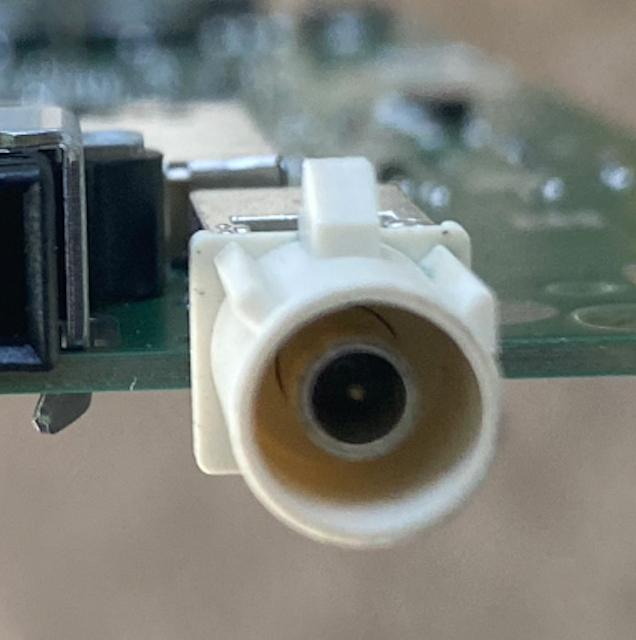
Looks like a normal Fakra antenna plug as the other antennae are.

Pin 1 is FM/DAB (2) Input
Shield is Ground
Published
Categorized as Analysis

Exploring Service Mode Plus

Entering Service Mode Plus

In order to enter Service Mode Plus, one either needs root access (good luck) or a 24-hour authorization token. For this exploration, I obtained a tbx-external (the lowest level) authorization token, which enabled some diagnostic operations and entering Service Mode Plus. Do not ask me for an authorization token. Besides what is noted below, everything else operates the same as normal Service Mode.

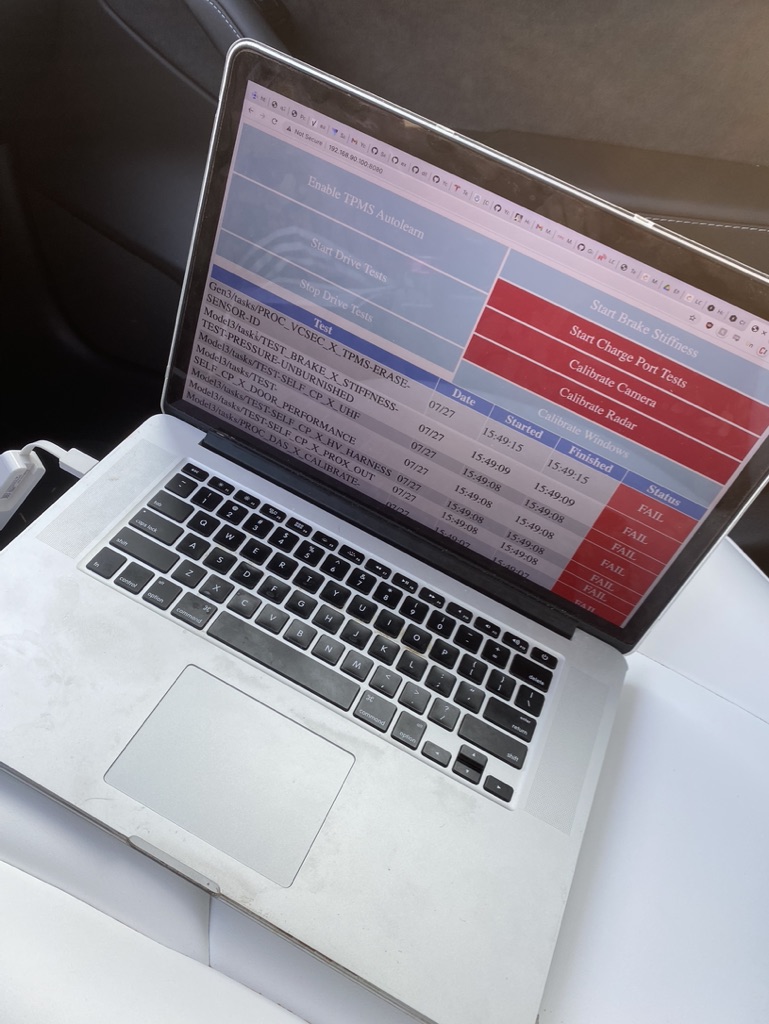
Systems Checks

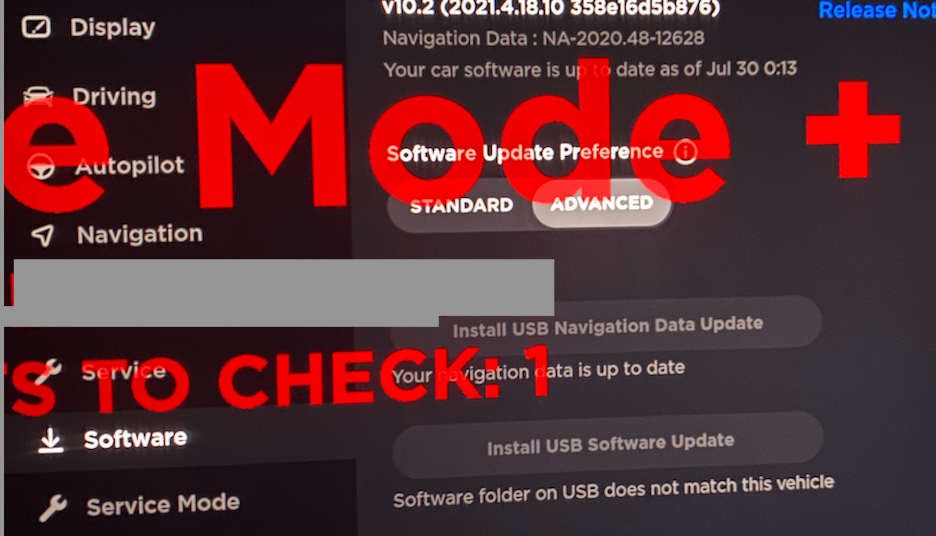
This new systems checks menu is populated on the diagnostics page when clicking “Diagnostics” in Service Mode Plus. One can also click each item to see detailed responses and run individual tasks again.

Apologies for the awful blurring job.

CAN Viewer

This is the CAN Viewer unlocked when in Service Mode +. The CAN data one can read in this state is very limited, but it can provide some useful insight nonetheless.

USB Updater

When in Service Mode Plus, two new options appear under the “Software” menu. The first allows one to install USB maps updates and the second installs firmware (CID/ICE/APE/Games). Details on how to perform these updates have yet to be determined and such information will need to be protected.

Published
Categorized as Analysis

Experimenting with ICE-Updater [outdated]

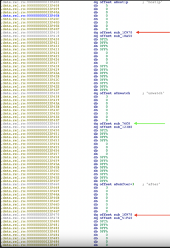
There is not much I can tell you about updater disassembly since it’s highly unreadable, but still there are some interesting parts. I.e. in version 2021.4.15 starting at offset 0x33F2E0 there is a table of all possible ice-updater commands. Most of them are locked out for unauthorized users – you can tell it by next function address, 0x76c0 corresponds to unlocked methods (with few exceptions) and 0x1c970 corresponds to locked ones. Look at the screenshot attached for a few samples.

You can call the above commands with simple http call from the internal network:
curl -v http://192.168.90.100:20564/status
Most interesting of these is override_handshake – that command takes a JSON file that could be used to provide custom firmware images, servers and parameters to the updater. Unfortunately images are signed with Ed25519 signature and it’s practically unhackable, so it could be helpful only to redeploy existing firmware image or flash a firmware slightly above or below your current version.

Tapping into ICE-Updater – Loki Method

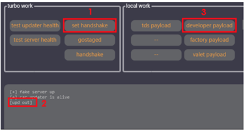
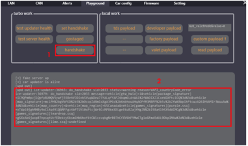
1) Loki’s method involves ‘setting a handshake’ and then providing a developer payload. It references ‘upd out’, so best guess is we’re sending an exploited update?

Could this be the override_handshake function on the ice-updater which accepts a JSON input file?
Loki has a local handshake server running to support this operation. See tesla_proxy/index.php on friend’s github.

2) Next, Loki’s method involves performing a handshake.

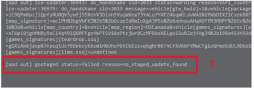
No actual update is conducted (update not found), but the desired affect is somehow achieved.

3) And finally, Loki sends a ‘gostaged’ message which seems to execute the payload.

—————————–

This method is used to enable developer mode, factory mode, tds mode, etc. It also allows Loki to update Gateway config (no longer working on newer version; see hardware method of opening GW). After setting the value in the GUI, they again perform set handshake, then handshake.

So, some method along the lines of passing in ‘hacked’ update files to ICE-Updater is allowing Loki to edit GW config, set debug modes, update navigation data, among other things. Likely via curl calls to debug ports or arbitrary code execution (could this be calling gwxfer?).

Published
Categorized as Analysis

Guide: Setting up a Bench Unit

So you’ve decided you’re going to start tinkering and want to get a unit on your bench? While some things are obvious to me now, they weren’t when I had first started this journey. So hopefully this brief guide, which compiles already public information along with some tips I’ve learned, makes it easier for you to set up your unit on a bench.

I find it obligatory to shout out Lewurm who provided the initial public info to help get me set up, and @greentheonly on Twitter who answered some questions to help me get started, and then some 🙂

What you will need

The Model 3/Y computer. Couple hundred bucks on ebay, depending which HW version you obtain.

A 12V power supply. Unless you are planning to input fake CAN data into the MCU or AP unit, the amperage draw will be very low. I would recommend a 5amp power supply to power both units; though 2A should probably be enough.

Wires. I have a large number of Dupont wires which make things easier for plugging and unplugging from certain pins.

Heat-shrink tubing (various size pack). This will be how you connect to the odd-sized pins on the unit. Extremely useful given the odd-sized pins used on the computer. A lighter is sufficient to heat it.

(Recommended) Anti-static wrist strap. Don’t want to short anything, especially if you will be taking the covers off.

(Optional) Connectors – If you know what ports you want to connect to and you would like to use the connector designed for that port, order those ahead of time. Aliexpress is not known for their speed.

(Optional) A Touchscreen – I have not gotten this working yet though.

Getting Started

Ensure your power supply is NOT plugged in. Strip off the ends of positive and ground wires of your power supply.

Use heat-shrink tubing that is just slightly larger than the wire to cover all of the exposed positive wire, leaving the heat-shrink tubing slightly overhanging the ends of the wire. Apply heat and ensure the tubing still slightly overhangs the wire. Leave the ground wire as is.

Now get your power supply and wires in a position where there is little to no weight on the end of the wire that will plug into the MCU.

Apply your ground wire to the casing of the MCU. You can ground to a screw on the case, on the board, or on the grounding cable attached to the MCU (if provided with your unit). Ensure the ground connection is secure.

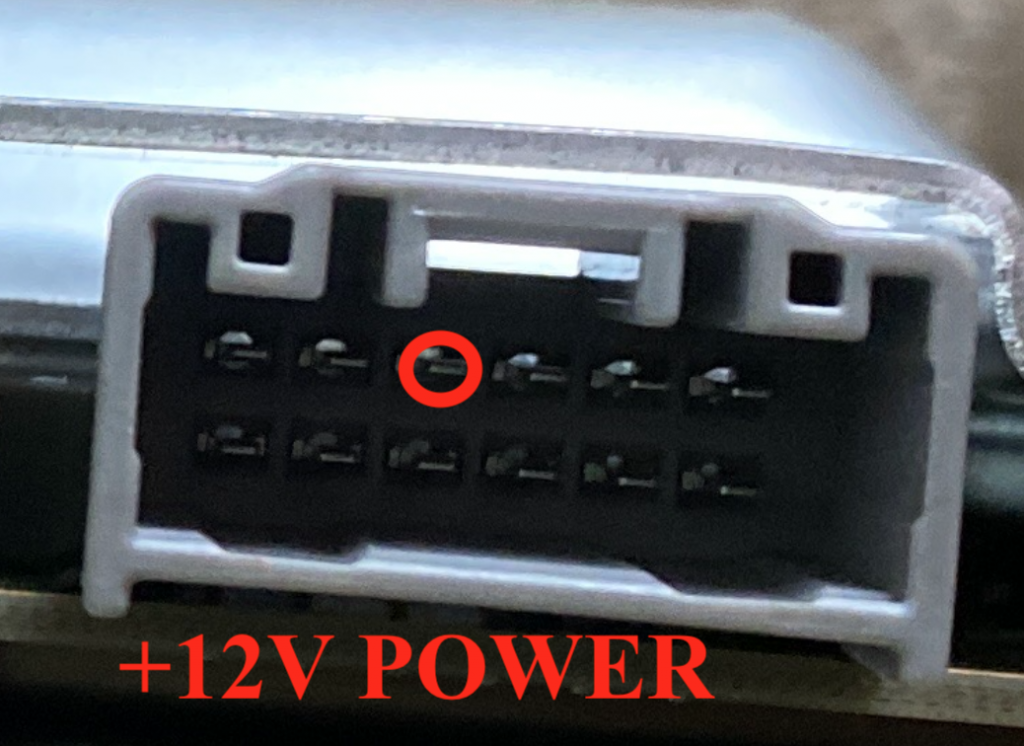
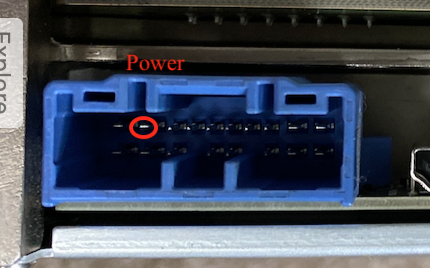
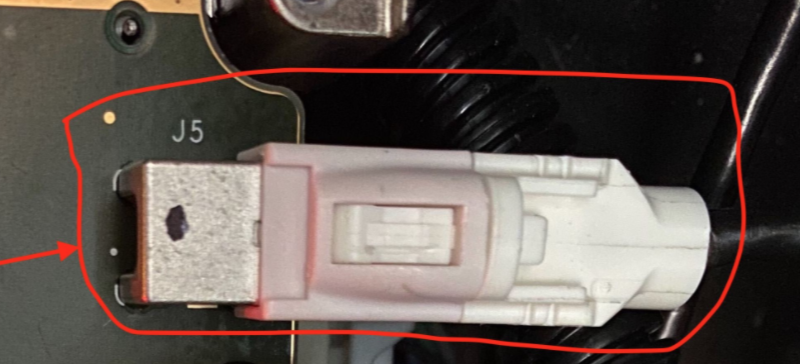
Finally, plug your heat-shrinked positive wire onto the pin highlighted below.

For more details on this connector, see this post.

Ensure it fits snugly!

If you have a display, plug that in as well prior to powering on the unit (though mine has never actually turned on). When ready, plug in the power supply.

Confirming the Computer Works

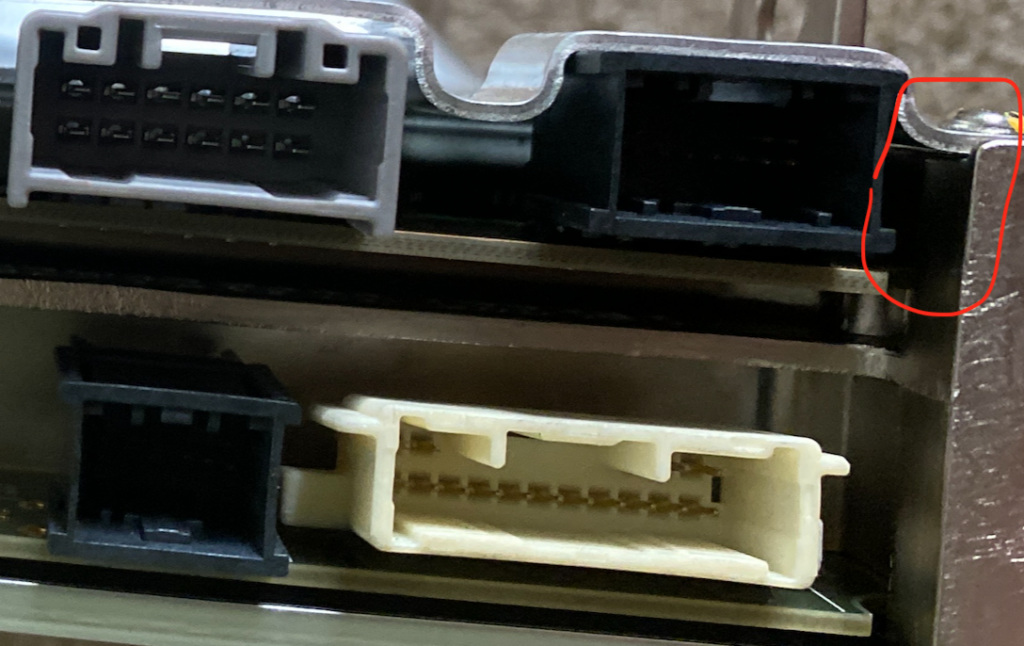
After applying power, you can look through the spot circled below to check for flashing lights.

If the unit is powering on properly, you will see flashing red and later flashing red and green lights. You can also confirm these lights are flashing by removing the MCU cover. After a minute or two the display should turn on – tap it in case it does not come on or only comes on briefly.

You can alternatively confirm that the unit works by connecting to it via Ethernet over the RJ45 port, as discussed in more detail in this post. In brief, connect to the Ethernet port, set your IP to 192.168.90.125 and subnet mask to 255.255.255.0, then navigate to http://192.168.90.100:8080. If the page loads, the MCU works. It may take up to a minute for this to work after applying power.

That’s it! Your unit is powered on and ready to be toyed with. Have fun, and let me know if you find anything cool! 🙂

Published
Categorized as Analysis

MCU Connector Information

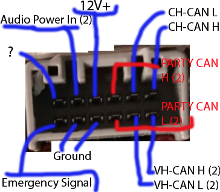
MCU Power Connector

This is connector X170

Part is Sumitomo 6098-5718

Pin 1+2 is CAN H+L (2)
Pin 4 is main power, always on.      
Pin 5 is audio power in (2)
Pin 7+8 is VH-CAN H+L (2)
Pin 3+9 is PARTY CAN H+L (2)
Pins 10+11 are Ground
Pin 12 is Emergency Notification Signal Input
Pin 6 is unknown, possibly unused?

You can apply power to the +12V pin and ground to the case.

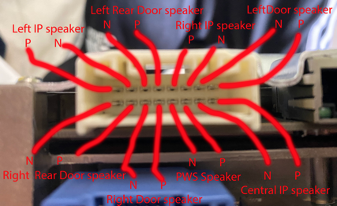
MCU Audio Connector

This is connector number X171. Part number is Sumitomo 6098-6203.

Pins 1+2 Left Door speaker P+N 
Pins 9+10 Central IP speaker P+N 
Pins 8+7 Left IP speaker P+N 
Pins 4+3 Right IP speaker P+N
Pins 11+12 PWS audio P+N
Pins 14+13 Right door speaker P+N
Pins 5+6 Left rear door speaker
Pins 16+15 Right rear door speaker

Not much of interest to me here.

MCU RJ45 – Fast Ethernet

This is info on the MCU connector which is a standard RJ45 Fast Ethernet port. Removing the one piece of trim held in by 5 clips near the passenger’s feet allows us to connect with not too much trouble.

The drivers footwell port provides the same access. Info on building a harness for that port is here. Actual connector can be bought with pins here.

CID:        192.168.90.100 #A.K.A. MCU
IC:         192.168.90.101 #Not Present in 3/Y
Gateway:    192.168.90.102
AP:         192.168.90.103
AP-?:       192.168.90.104 #Seen in HW3
APE-B:      192.168.90.105
Tuner:      192.168.90.30 
Diagnostic: 192.168.90.125 #Used for connecting to Driver's footwell

To connect, set your IP to 192.168.90.125 and subnet mask to 255.255.255.0. It is not possible to reach other devices on the network due to seceth rules unfortunately, but we can see that ports 22 (ssh) and 8080 (http) are open on the CID/MCU at 192.168.90.100.

We can attempt to reach ssh on the MCU at port 22. Auth is by certificate only though, and we obviously do not have the certificates needed; nor are they stored in the firmware files. The ssh version used is 7.9 as per firmware version 2021.4.18.10.

We can reach a front-facing page for the ODIN service at the HTTP interface on http port 8080 of the MCU, specifically at http://192.168.90.100:8080/. A number of functions (presumably used in the factory) are listed. None of them work though, as an authentication token is need to run nearly any ODIN function.

BroadR-Reach

HW2.5 -> HW3 (maybe including 3.1) use 100BASE-T1 BroadR-Reach protocol for communication between both the AP and the MCU, and the radio and the MCU.

X172 is the black connector that goes into the AP unit. The connector is TE 2177587-1

Pin Numbers
Pin 1 BR Eth P (AP)
Pin 2 BR ETH N (AP)
Pin 11 BR Eth N (Radio)
Pin 12 BR Eth P (Radio)
Pines 3+4 are audio to overhead speaker
Pins 7-10 are the Drivers Diag ETH Port

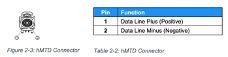
Pins 1 and 2 are not used on HW3.2 as it uses Rosenberger H-MTD instead. This is for Gigabit BroadR-Reach, or 1000BASE-T1. A higher-end adapter is required.

UNCONFIRMED pins for H-MTD. This is standard pinout, I presume Tesla will follow. Wires are green and white.

If connecting to the AP interface, set your IP address as 192.168.90.103. The ice-updater is accessible at port 20564 of the MCU. One can also access some ports assigned for autopilot functions.

Tuner interface (192.168.90.30) can also access ice-updater, ssh on the MCU, and port 5555 (something radio related?). For both connections, no access to the gateway is provided.

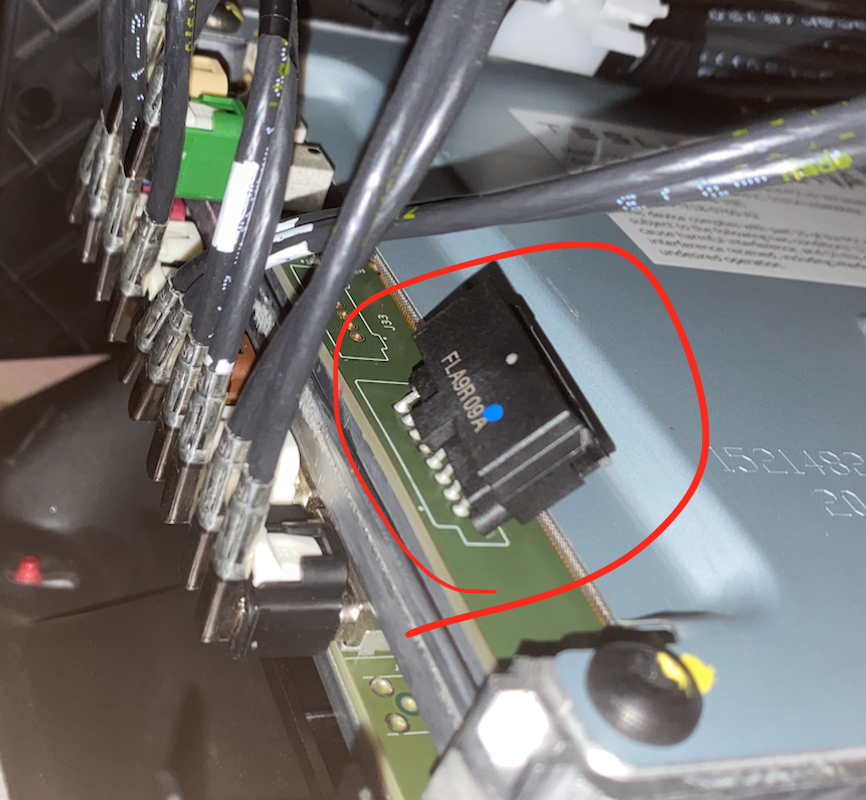
eCall / Emergency Connector

Location of the Connector
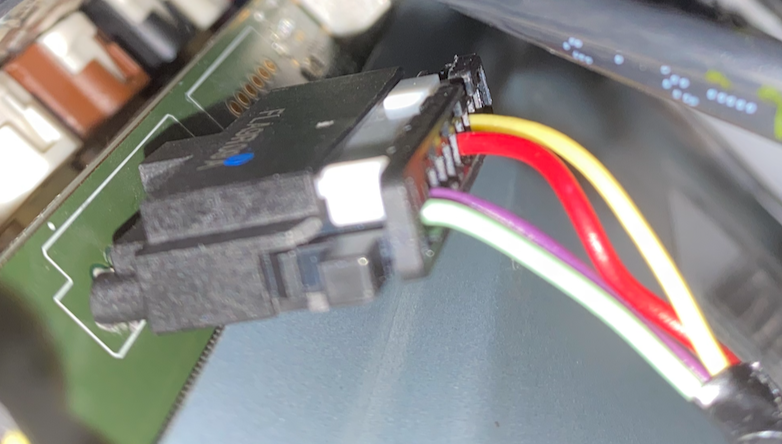
Connector plugged in

This is connector X173.

Pin 1 (green)   - Emergency Audio Out (N)
Pin 2 (violet)  - Emergency Audio Out (P)
Pin 6 (red)     - eCall Standby Power (+)
Pin 8 (yellow)  - RCM ENS In (eCall Passthrough)

This connector was introduced in HW3.0. By default, it is not connected on cars outside of Europe; though it is present.

FAKRA HSD Linking MCU and AP2.5

X800-H on AP to X859-H on MCU is the Fakra HSD port that connects the MCU and the AP units to send video. Just use Fakra HSD type-Z as its universal.

From what I hear from sources, this may be a normal Ethernet connection that can be tapped in to. Hopefully applies to all Fakra HSD connectors? I do not have a unit that uses this to confirm.

Connecting the Display

X860 connects the MCU to the display.

Pin 1 - 12v power (separate from Fakra HSD)
Pin 2 - ground (separate from Fakra HSD)
Pins 3-6 are used to transmit video

Must be connected before booting to work. Pin 1 is closer to the edge of the MCU, pin 2 is closer to the center.

Published
Categorized as Analysis

Connector Information – Autopilot Unit

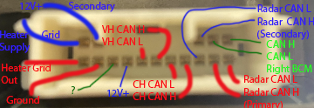
AP White Connector

For AP connector X121 is used for CAN.

Wiring Diagram
Pin 4+5+13 are inputs for 12V up to 5A.
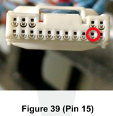
Pin 15 is ground. 
Pins 9+10 are CH CAN H+L
11+12 are VH CAN H+L
Pins 1+2 CAN H/L Right Body Controller
Pins 7+6 are Primary CAN H/L to Radar
Pins 3+8 are Secondary CAN H/L to Radar
Connector which plugs in to the AP unit.

Pin counting is assumed to be left to right, then down and around. This may not be accurate but I think it is given the diagram.

AP Blue Connector

Connector X120 is the blue connector. It is used for power.

Pins 1+11 are eCall audio P+N
Pins 5+6 are PARTY CAN H+L 
Pin 9 is 12V power in, up to 20A
Pin 18 is ground.

AP BroadR-Reach Connector

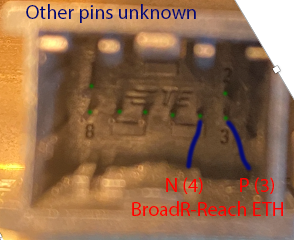
Connector X122 is used to connect MCU<->AP via BroadR-Reach. Connector is TE 2177586-1

Pin 3 is BR ETH P
Pin 4 is BR ETH N

Other pins are unknown and/or not used in production per wiring diagrams. From my brief look around, not much can be accessed here besides some UDP video feeds and the updater service.

This is also not present on HW3.2 as the connection was replaced with Rosenberger H-MTD cable to support gigabit BroadR-Reach (1000BASE-T1).

H-MTD Jumper Cable for MCU<->AP (MCU Side)

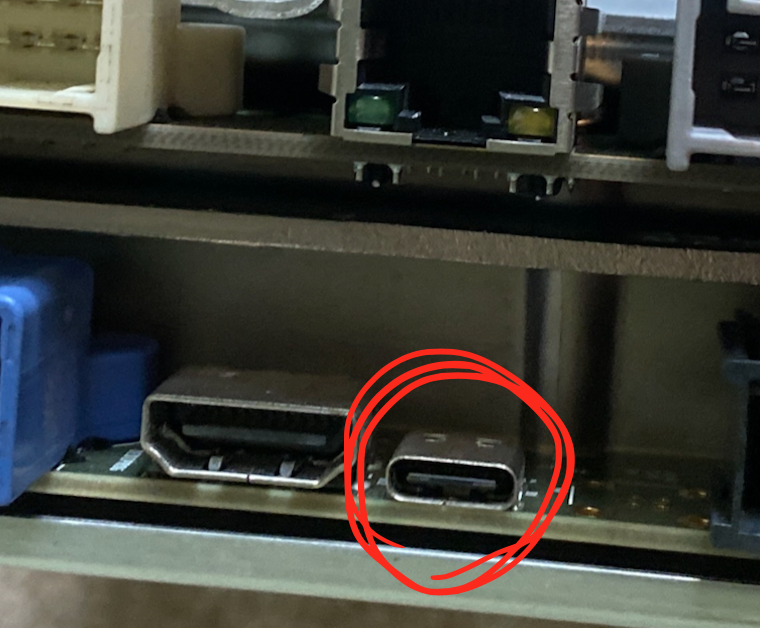
USB-C Debug Ethernet

A USB-C connector which is not coded by Tesla is used for debug on the AP unit over Ethernet.

AP Debug Ethernet
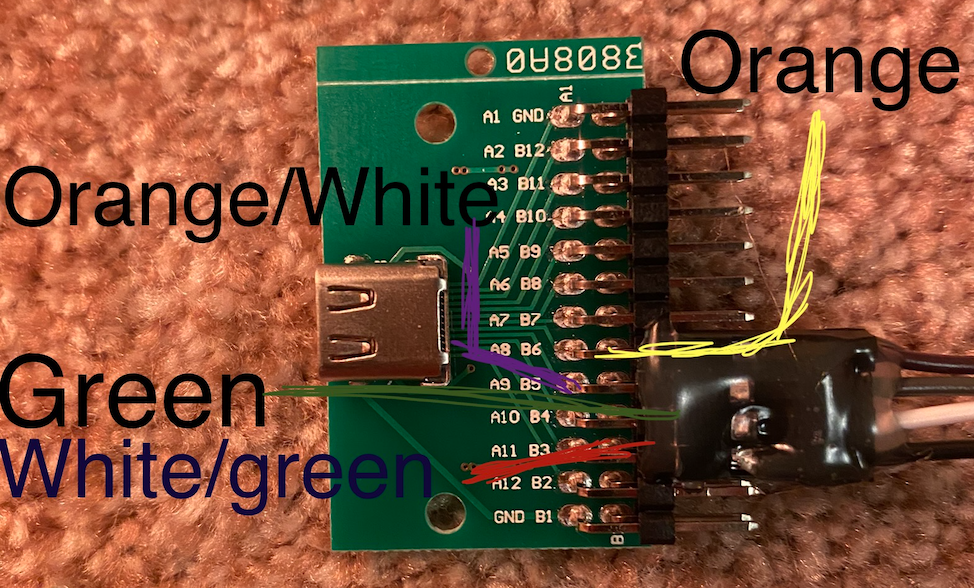
USB-C Breakout Board

When connected to a USB-C breakout board, these four pins are used for the Ethernet connection. The same four pins are mirrored on the other side of the board and provide the exact same access.

At least on production vehicles, absolutely nothing in accessible from this port. While an Ethernet connection is created, we are not able to access anything from this connector.

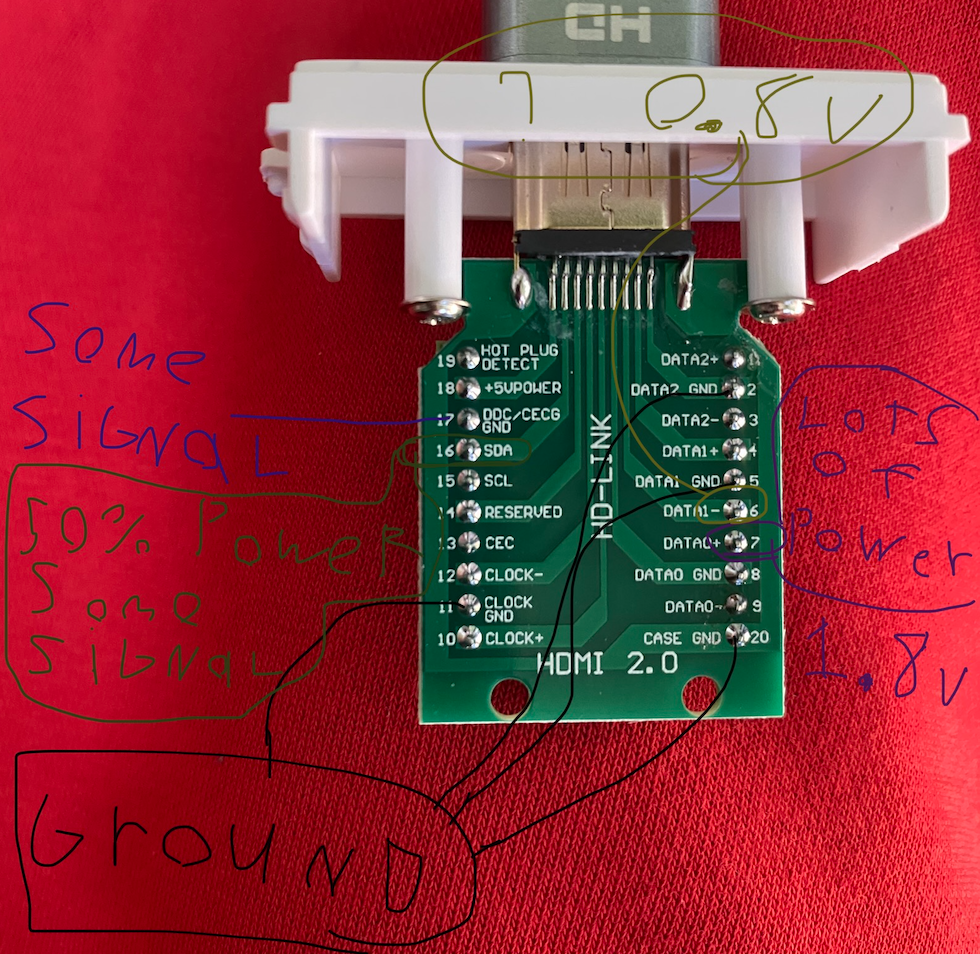
SPI Flash / JTAG ? (HDMI Connector)

An HDMI connector is present to program the SPI Flash. I have not done much with this and I hear the flash is encrypted/checked, but this is some basic pin information

Limited information on the SPI flash over HDMI connection

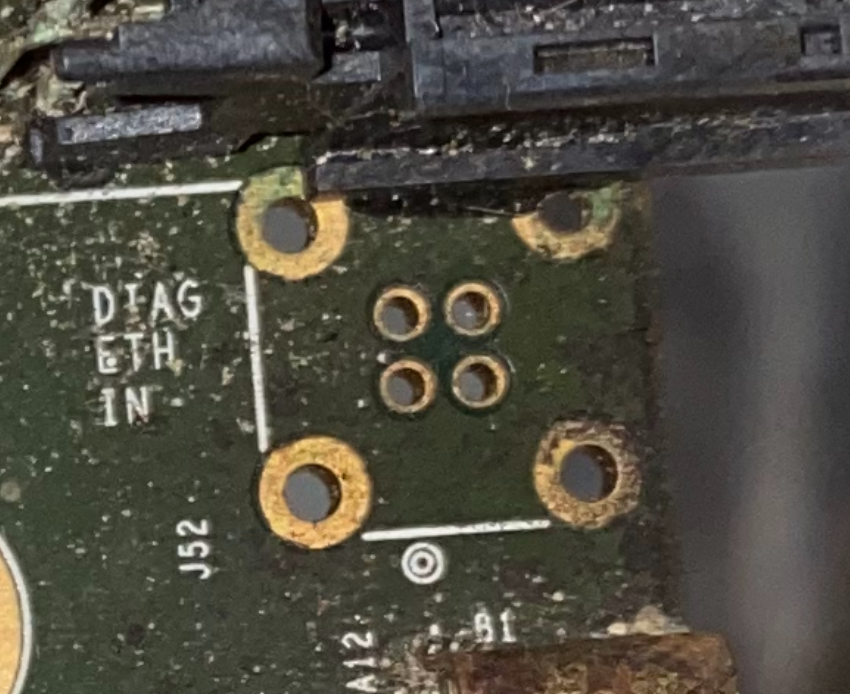
Diagnostic Ethernet

There is no header here but it is labeled Diag ETH In

Please excuse how filthy this board is. It was in a fire and then water damaged by the fire department.
Top Left     - Green
Top Right    - Green/White
Bottom Left  - Orange
Bottom Right - Orange/White

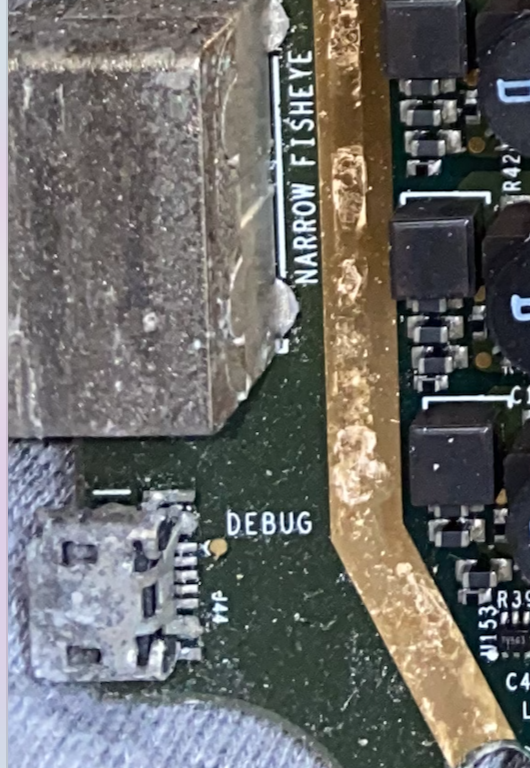
Micro-USB? (No Header)

Previously I’ve seen a micro-usb here with no header; presumably used for serial debugging.

Micro-USB on bottom. Or maybe micro-HDMI?

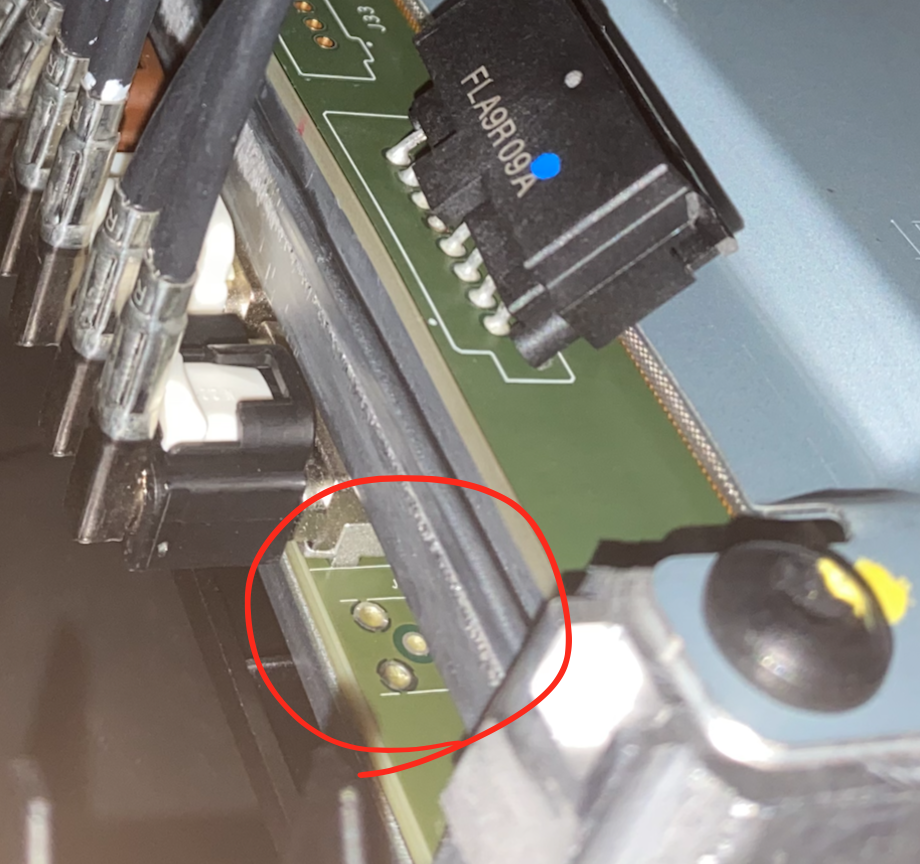
Right Repeater 2

This is a header for a second right repeater. Not used in any vehicles at the moment.

Recovery Mode Analysis

Connecting

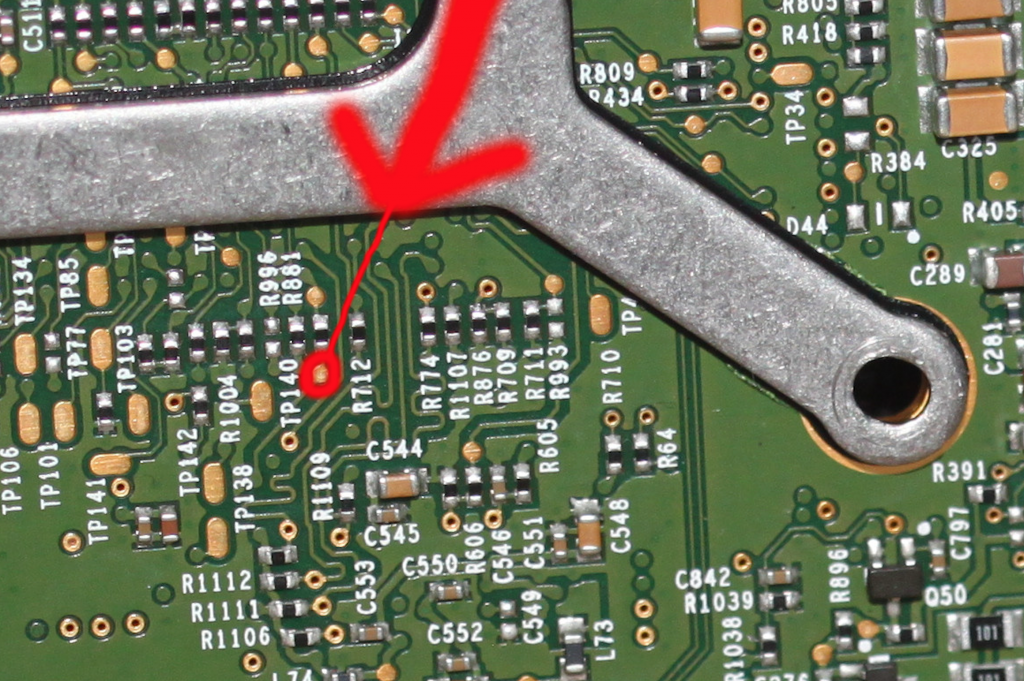
It is possible to access the gateway and update config by shorting the CLOCK pin of the eMMC (replicating as if it was not there) prior to booting.

  • 1) Disconnect all power to the MCU.
  • 2) Short the pin highlighted below to ground
  • 3) Apply power to the unit.
  • 4) Wait at least 12 minutes without connecting for gtw to unlock
  • 5) Connect to Ethernet via RJ45
  • 6) Set IP to 192.168.90.125 & subnet mask to 255.255.255.0
Close-up of the pin

TCP

When this is done, gateway is accessible on TCP ports 1050 and 10001. How to connect to these ports is unclear, (one could be TFTP?) but the first one seems to allow us to retrieve data from the Gateway’s SD card. Here is an nmap -A -Pn of the Gateway:

Not shown: 998 closed ports
PORT      STATE SERVICE               VERSION
1050/tcp  open  java-or-OTGfileshare?
| fingerprint-strings: 
|   DNSStatusRequestTCP: 
|     226472 BOOTED.IMG
|     UPDT
|     4668 MODINFO.LOG
|     CBREAKER.MAP
|     122342 MAP.TSV
|     113738 UDSDEBUG.LOG
|     1418112 LOG.DBG
|     229376 GAMEMODE.HRL
|     279173 SWITCH.DMP
|     90252 0029
|_    90932 0028
10001/tcp open  scp-config?
1 service unrecognized despite returning data. If you know the service/version, please submit the following fingerprint at https://nmap.org/cgi-bin/submit.cgi?new-service :
SF-Port1050-TCP:V=7.91%I=7%D=8/2%Time=6108516E%P=x86_64-apple-darwin17.7.0
SF:%r(DNSVersionBindReqTCP,1,"\0")%r(DNSStatusRequestTCP,C7,"\0\0A\xed\0\0
SF:\0\0-1\x20HRL\n-1\x20LOG\n226472\x20BOOTED\.IMG\n-1\x20UPDT\n4668\x20MO
SF:DINFO\.LOG\n796\x20CBREAKER\.MAP\n122342\x20MAP\.TSV\n113738\x20UDSDEBU
SF:G\.LOG\n1418112\x20LOG\.DBG\n229376\x20GAMEMODE\.HRL\n-1\x20CL\n279173\
SF:x20SWITCH\.DMP\n90252\x200029\n90932\x200028\n");

UDP

In the recovery state, the Gateway is also constantly sending UDP messages from port 49153 to 192.168.90.255 (broadcasting) at port 1234. These may be CAN data; I’m not sure.

The Gateway is also accessible via UDP on port 3500. Take note that this is “gtw3” or Gateway 3. Model S/X’s older MCU1 uses Gateway 2, which stores configurations in an internal.dat file.

To access and edit configurations on the gateway in this state, we can use the gw-diag binary included in Tesla firmware. Use gw-diag -s for a brief explanation of how to use it, and be sure to have all input values in hex format. You can also use printf with the socat command to send UDP messages shown when using the -v flag in gw-diag. The gwxfer binary also works to retrieve the contents of the SD card.

MCU

The MCU is also partially accessible on 192.168.90.100. The ice-updater (http://192.168.90.100:20564/), SSH (port 22), and port 49155 are open. I’m not sure what port 49155 is yet though). Below is the output of sending the status command to the ice-updater

❯ curl -v http://192.168.90.100:20564/status
*   Trying 192.168.90.100:20564...
* Connected to 192.168.90.100 (192.168.90.100) port 20564 (#0)
> GET /status HTTP/1.1
> Host: 192.168.90.100:20564
> User-Agent: curl/7.77.0
> Accept: */*
> 
* Mark bundle as not supporting multiuse
< HTTP/1.1 200 OK
< Content-Type: application/octet-stream
< Accept-Ranges: bytes
< Connection: close
< Date: 22 Feb 2012 06:58:25 GMT
< Server: updater/6d1088fd749530a3
< 
Executable: /deploy/ice-updater, personality: ice-updater, hash 6d1088fd749530a3, built for package version: 2020.12.10
uptime: 281.449807779s

/proc/uptime:
292.72 1137.34


current bootdata Contents: 0xff 0xff 0xff 0xff 0x00 0x00 0x00 0x00 0x1f 0x1f 0x1f 0x00 0x00 0x00 0x00 0x00 0x00 0x00 0x00 0x00 0x00 0x00 0x00 0x00 0x00 0x00 0x00 0x00 0x00 0x00 0x00 0x00 0x00 0x00 0x00 0x00 0x00 0x00 0x00 0x00 0x00 0x00 0x00 0x00 0x00 0x00 0x00 0x00 0x00 0x00 0x00 0x00 0x00 0x00 0x00 0x00 0x00 0x00 0x00 0x00 
Pattern:             0xffffffff
Online boot bank:    RECOVERY
Bank A fail count:   31
Bank B fail count:   31
Bank A dot-model-s size:  0
Bank B dot-model-s size:  0
MCU Board Revision:  
Fused: 1
Override-version: 0

Online map bank: UNKNOWN
Online map package size: 0
Online map signature: NULL
Offline map bank: UNKNOWN
Offline map package size: 0
Offline map signature: NULL

Game: purple
Online games bank: UNKNOWN
Online games package size: -1
Online games signature: INVALID
Offline games bank: UNKNOWN
Offline games package size: -1
Offline games signature: INVALID

Game: teardrop
Online games bank: UNKNOWN
Online games package size: -1
Online games signature: INVALID
Offline games bank: UNKNOWN
Offline games package size: -1
Offline games signature: INVALID

running_in_recovery_partition = 1
installed_firmware_signature = NULL
offline_firmware_signature = NULL
staged_update = no
gateway_needs_update = no
updating_maps = no

END STATUS
* Closing connection 0
> %  

USB Serial

Finally, here is the output of booting when the eMMC is removed (grabbed from the serial usb port). Later references to HTTP were printed when I called the status on the ice-updater’s api.

abl-APL: rel.1941
CPU: APL-D0 [4C @ 1600MHz: high SKU], ucode rev.3C; power-on reset
CSE: FW 3.1.72.2346, SB: On, MB: On
CSE: boot dev #2: SPI
PCB #B006:  (BMP fab.E, 4x8Gb), F:7; BM:0
MRC: [v0.56.41/89.24] FB OK(0): 4GB
CSE: send DID UMA 10000000, 34MB
auto-boot ...
image#0 - mmcbootX: eMMC boot: No image [err=2:ACK]
image#0 - mmc1:/iasImage: load err #-2
image#1 - ELK: copy ELK from SPI in 6927 ms
==> jump to image @100000 (setup @90000) ...
[    0.000000] Linux version 4.14.165-ELK ([email protected]) (gcc version 7.4.0 (crosstool-NG 1.24.0)) #2 SMP Wed Apr 15 07:20:07 UTC 2020
[    0.000000] Command line: console=tty0 init=/sbin/init ro rootwait ip=192.168.90.100 clocksource=tsc loglevel=7 console=ttyS2,115200n8 earlycon=uart8250,mmio32,0xfc000000,115200n8 modprobe.blacklist=dwc3 rng_core.default_quality=1000 ABL.bdev=ELK ABL.boot=0 ABL.csever=3.1.72.2346 ABL.bpdt1=0x000055aa,0x00000005 ABL.bpdt2=0x000055aa,0x00000005 ABL.hwver=53,4,1600,b006,1,4096 ABL.mrcthreshold=0,0 ABL.memser=0x00000001 ABL.reset=power-on ABL.seed=0,0 ABL.seed_list=d41c0,d40a0 ABL.oemkm=354@c1454 ABL.timestamps=64@0xc0000 ABL.consbuf=0xdc000 ABL.version=rel.1941 ABL.status=0x3
[    0.000000] KERNEL supported cpus:
[    0.000000]   Intel GenuineIntel
[    0.000000] x86/fpu: Supporting XSAVE feature 0x001: 'x87 floating point registers'
[    0.000000] x86/fpu: Supporting XSAVE feature 0x002: 'SSE registers'
[    0.000000] x86/fpu: Supporting XSAVE feature 0x008: 'MPX bounds registers'
[    0.000000] x86/fpu: Supporting XSAVE feature 0x010: 'MPX CSR'
[    0.000000] x86/fpu: xstate_offset[3]:  576, xstate_sizes[3]:   64
[    0.000000] x86/fpu: xstate_offset[4]:  640, xstate_sizes[4]:   64
[    0.000000] x86/fpu: Enabled xstate features 0x1b, context size is 704 bytes, using 'compacted' format.
[    0.000000] e820: BIOS-provided physical RAM map:
[    0.000000] BIOS-e820: [mem 0x0000000000000000-0x0000000000097fff] usable
[    0.000000] BIOS-e820: [mem 0x0000000000098000-0x000000000009ffff] reserved
[    0.000000] BIOS-e820: [mem 0x00000000000c0000-0x00000000000fffff] reserved
[    0.000000] BIOS-e820: [mem 0x0000000000100000-0x000000000fffffff] usable
[    0.000000] BIOS-e820: [mem 0x0000000010000000-0x00000000121fffff] reserved
[    0.000000] BIOS-e820: [mem 0x0000000012200000-0x000000007afcdfff] usable
[    0.000000] BIOS-e820: [mem 0x000000007afce000-0x000000007afdcfff] ACPI data
[    0.000000] BIOS-e820: [mem 0x000000007afdd000-0x000000007afdffff] ACPI NVS
[    0.000000] BIOS-e820: [mem 0x000000007afe0000-0x000000007fffffff] reserved
[    0.000000] BIOS-e820: [mem 0x00000000e0000000-0x00000000efffffff] reserved
[    0.000000] BIOS-e820: [mem 0x00000000fed00000-0x00000000fedfffff] reserved
[    0.000000] BIOS-e820: [mem 0x00000000ff800000-0x00000000ffffffff] unusable
[    0.000000] BIOS-e820: [mem 0x0000000100000000-0x000000017fffffff] usable
[    0.000000] earlycon: uart8250 at MMIO32 0x00000000fc000000 (options '115200n8')
[    0.000000] bootconsole [uart8250] enabled
[    0.000000] NX (Execute Disable) protection: active
[    0.000000] tsc: Using PIT calibration value
[    0.000000] e820: last_pfn = 0x180000 max_arch_pfn = 0x400000000
[    0.000000] x86/PAT: Configuration [0-7]: WB  WT  UC- UC  WB  WT  UC- UC  
[    0.000000] e820: last_pfn = 0x7afce max_arch_pfn = 0x400000000
[    0.000000] Using GB pages for direct mapping
[    0.000000] ACPI: Early table checksum verification disabled
[    0.000000] ACPI: RSDP 0x00000000000FFE80 000024 (v02 INTEL )
[    0.000000] ACPI: XSDT 0x000000007AFDCF30 00005C (v01 INTEL  EDK2     00000005 INTL 0100000D)
[    0.000000] ACPI: FACP 0x000000007AFD6B10 00010C (v05 INTEL  EDK2     00000005 INTL 0100000D)
[    0.000000] ACPI: DSDT 0x000000007AFCF890 006764 (v02 INTEL  BXT-SOC  00000000 INTL 20160527)
[    0.000000] ACPI: FACS 0x000000007AFDCEF0 000040
[    0.000000] ACPI: APIC 0x000000007AFD6A80 000084 (v03 INTEL  EDK2     00000000 INTL 0100000D)
[    0.000000] ACPI: MCFG 0x000000007AFD6A40 00003C (v01 INTEL  EDK2     00000001 INTL 0100000D)
[    0.000000] ACPI: HPET 0x000000007AFD6A00 000038 (v01 INTEL  EDK2     00000005 INTL 0100000D)
[    0.000000] ACPI: NHLT 0x000000007AFCEA20 0005D9 (v00 INTEL  NHLT-GPA 00000008 NTET 00000003)
[    0.000000] ACPI: DMAR 0x000000007AFD6050 0000B0 (v01 INTEL  BDW      00000001 INTL 00000001)
[    0.000000] ACPI: TPM2 0x000000007AFD6010 000034 (v03                 00000000      00000000)
[    0.000000] Zone ranges:
[    0.000000]   DMA      [mem 0x0000000000001000-0x0000000000ffffff]
[    0.000000]   DMA32    [mem 0x0000000001000000-0x00000000ffffffff]
[    0.000000]   Normal   [mem 0x0000000100000000-0x000000017fffffff]
[    0.000000] Movable zone start for each node
[    0.000000] Early memory node ranges
[    0.000000]   node   0: [mem 0x0000000000001000-0x0000000000097fff]
[    0.000000]   node   0: [mem 0x0000000000100000-0x000000000fffffff]
[    0.000000]   node   0: [mem 0x0000000012200000-0x000000007afcdfff]
[    0.000000]   node   0: [mem 0x0000000100000000-0x000000017fffffff]
[    0.000000] Initmem setup node 0 [mem 0x0000000000001000-0x000000017fffffff]
[    0.000000] Reserving Intel graphics memory at 0x000000007c000000-0x000000007fffffff
[    0.000000] ACPI: PM-Timer IO Port: 0x408
[    0.000000] ACPI: LAPIC_NMI (acpi_id[0x01] high level lint[0x1])
[    0.000000] ACPI: LAPIC_NMI (acpi_id[0x02] high level lint[0x1])
[    0.000000] ACPI: LAPIC_NMI (acpi_id[0x03] high level lint[0x1])
[    0.000000] ACPI: LAPIC_NMI (acpi_id[0x04] high level lint[0x1])
[    0.000000] IOAPIC[0]: apic_id 8, version 32, address 0xfec00000, GSI 0-119
[    0.000000] ACPI: INT_SRC_OVR (bus 0 bus_irq 0 global_irq 2 dfl dfl)
[    0.000000] ACPI: INT_SRC_OVR (bus 0 bus_irq 9 global_irq 9 low level)
[    0.000000] Using ACPI (MADT) for SMP configuration information
[    0.000000] ACPI: HPET id: 0x8086a701 base: 0xfed00000
[    0.000000] smpboot: Allowing 4 CPUs, 0 hotplug CPUs
[    0.000000] e820: [mem 0x80000000-0xdfffffff] available for PCI devices
[    0.000000] clocksource: refined-jiffies: mask: 0xffffffff max_cycles: 0xffffffff, max_idle_ns: 1910969940391419 ns
[    0.000000] setup_percpu: NR_CPUS:64 nr_cpumask_bits:64 nr_cpu_ids:4 nr_node_ids:1
[    0.000000] percpu: Embedded 38 pages/cpu s126424 r0 d29224 u524288
[    0.000000] Built 1 zonelists, mobility grouping on.  Total pages: 1003280
[    0.000000] Kernel command line: console=tty0 init=/sbin/init ro rootwait ip=192.168.90.100 clocksource=tsc loglevel=7 console=ttyS2,115200n8 earlycon=uart8250,mmio32,0xfc000000,115200n8 modprobe.blacklist=dwc3 rng_core.default_quality=1000 ABL.bdev=ELK ABL.boot=0 ABL.csever=3.1.72.2346 ABL.bpdt1=0x000055aa,0x00000005 ABL.bpdt2=0x000055aa,0x00000005 ABL.hwver=53,4,1600,b006,1,4096 ABL.mrcthreshold=0,0 ABL.memser=0x00000001 ABL.reset=power-on ABL.seed=0,0 ABL.seed_list=d41c0,d40a0 ABL.oemkm=354@c1454 ABL.timestamps=64@0xc0000 ABL.consbuf=0xdc000 ABL.version=rel.1941 ABL.status=0x3
[    0.000000] log_buf_len individual max cpu contribution: 131072 bytes
[    0.000000] log_buf_len total cpu_extra contributions: 393216 bytes
[    0.000000] log_buf_len min size: 262144 bytes
[    0.000000] log_buf_len: 1048576 bytes
[    0.000000] early log buf free: 254164(96%)
[    0.000000] PID hash table entries: 4096 (order: 3, 32768 bytes)
[    0.000000] Dentry cache hash table entries: 524288 (order: 10, 4194304 bytes)
[    0.000000] Inode-cache hash table entries: 262144 (order: 9, 2097152 bytes)
[    0.000000] Memory: 3920832K/4076948K available (6152K kernel code, 327K rwdata, 660K rodata, 4428K init, 428K bss, 156116K reserved, 0K cma-reserved)
[    0.000000] SLUB: HWalign=64, Order=0-3, MinObjects=0, CPUs=4, Nodes=1
[    0.000000] Hierarchical RCU implementation.
[    0.000000]  CONFIG_RCU_FANOUT set to non-default value of 32
[    0.000000]  RCU restricting CPUs from NR_CPUS=64 to nr_cpu_ids=4.
[    0.000000] RCU: Adjusting geometry for rcu_fanout_leaf=16, nr_cpu_ids=4
[    0.000000] NR_IRQS: 4352, nr_irqs: 1024, preallocated irqs: 16
[    0.000000] Console: colour dummy device 80x25
[    0.000000] console [tty0] enabled
[    0.000000] console [ttyS2] enabled
[    0.000000] bootconsole [uart8250] disabled
[    0.893892] console [ttyS2] enabled
[    0.898780] dw-apb-uart.11: ttyS3 at MMIO 0xb3c3a000 (irq = 7, base_baud = 6250000) is a 16550A
[    0.909526] igb: Intel(R) Gigabit Ethernet Network Driver - version 5.4.0-k
[    0.917317] igb: Copyright (c) 2007-2014 Intel Corporation.
[    1.265357] igb 0000:02:00.0: Intel(R) Gigabit Ethernet Network Connection
[    1.273080] igb 0000:02:00.0: eth0: (PCIe:2.5Gb/s:Width x1) a4:34:d9:01:02:03
[    1.281082] igb 0000:02:00.0: eth0: PBA No: FFFFFF-0FF
[    1.286850] igb 0000:02:00.0: Using MSI-X interrupts. 4 rx queue(s), 4 tx queue(s)
[    1.296288] device-mapper: ioctl: 4.37.0-ioctl (2017-09-20) initialised: [email protected]
[    1.305778] intel_pstate: Intel P-state driver initializing
[    1.312628] NET: Registered protocol family 17
[    1.319171] microcode: sig=0x506c9, pf=0x2, revision=0x3c
[    1.325690] microcode: Microcode Update Driver: v2.2.
[    1.325712] sched_clock: Marking stable (1325622941, 0)->(1338798005, -13175064)
[    1.383305] igb 0000:02:00.0 eth0: igb: eth0 NIC Link is Up 1000 Mbps Full Duplex, Flow Control: None
[    3.471181] igb 0000:02:00.0: exceed max 2 second
[    3.490179] IP-Config: Guessing netmask 255.255.255.0
[    3.495873] IP-Config: Complete:
[    3.499504]      device=eth0, hwaddr=a4:34:d9:01:02:03, ipaddr=192.168.90.100, mask=255.255.255.0, gw=255.255.255.255
[    3.511428]      host=192.168.90.100, domain=, nis-domain=(none)
[    3.518164]      bootserver=255.255.255.255, rootserver=255.255.255.255, rootpath=
[    3.526880] ttyS2 - failed to request DMA
[    3.535313] Freeing unused kernel memory: 4428K
[    3.546194] Write protecting the kernel read-only data: 10240k
[    3.554241] Freeing unused kernel memory: 2032K
[    3.565687] Freeing unused kernel memory: 1388K
[    3.570791] rodata_test: all tests were successful
mount: mounting devtmpfs on /dev failed: Resource busy
192.168.90.100 is alive!
sfdisk: cannot open /dev/mmcblk0: No such file or directory
e2fsck 1.45.4 (23-Sep-2019)
e2fsck: No such file or directory while trying to open /dev/mmcblk0p1
Possibly non-existent device?
mke2fs 1.45.4 (23-Sep-2019)
The file /dev/mmcblk0p1 does not exist and no size was specified.
mount: mounting /dev/mmcblk0p1 on /mnt/mmcblk0p1 failed: No such file or directory
mount: can't find /mnt/mmcblk0p1 in /proc/mounts
[    3.641686] random: fast init done
Epoch from Gateway: 1627936015
Mon Aug  2 20:26:55 UTC 2021
VIN from Gateway: 5YJ3E1EA7JF040990
Genealogy from Gateway: 1098058-00-J-PGT18141A00030
[   11.243579] random: crng init done
updater.c:39619: Personality: ice-updater
updater.c:5758: created staged_report_dir_path = /var/spool/ice-updater/staged, terminated_report_dir_path = /var/spool/ice-updater/terminated
updater.c:5769: created spool_dir_path = /var/spool/ice-updater, dev_id = 0x10
updater.c:5776: created gostaged_sentinel_dir_path = /var/spool/ice-updater/gostaged
Looking for 'ABL.bdev=ELK' in 'console=tty0 init=/sbin/init ro rootwait ip=192.168.90.100 clocksource=tsc loglevel=7 console=ttyS2,115200n8 earlycon=uart8250,mmio32,0xfc000000,115200n8 modprobe.blacklist=dwc3 rng_core.default_quality=1000 ABL.bdev=ELK ABL.boot=0 ABL.csever=3.1.72.2346 ABL.bpdt1=0x000055aa,0x00000005 ABL.bpdt2=0x000055aa,0x00000005 ABL.hwver=53,4,1600,b006,1,4096 ABL.mrcthreshold=0,0 ABL.memser=0x00000001 ABL.reset=power-on ABL.seed=0,0 ABL.seed_list=d41c0,d40a0 ABL.oemkm=354@c1454 ABL.timestamps=64@0xc0000 ABL.consbuf=0xdc000 ABL.version=rel.1941 ABL.status=0x3
'
Welcome to /bin/ice-updater (6d1088fd749530a3)
Welcome to Tesla ice-updater (self_hash=6d1088fd749530a3, git_sha=e0ccfda3d911bb2f785780ca6e4b5def56072705)!
ice-updater:38724: log_session status=initialized sid=1 fd=1 commit=e0ccfda3d911bb2f785780ca6e4b5def56072705
ice-updater: 7670: remount_if_necessary status=mounting source=/dev/mmcblk0p1 target=/mnt/mmcblk0p1 wantflags=1055
ice-updater: 7675: remount_if_necessary status=error source=/dev/mmcblk0p1 target=/mnt/mmcblk0p1 wantflags=1055 errno=No such file or directory
ice-updater:39103: fetch bootdata failed
ice-updater:39180: Creating command listener for personality ice-updater (8) on port 25956

ice-updater:39187: Command service listener has fd 7

ice-updater:39189: Creating HTTP listener for personality ice-updater (8) on port 20564

ice-updater:39196: HTTP service listener has fd 8

ice-updater:28986: write_file status=error path= open=No such file or directory
ice-updater:39219: initialize_default_sessions status=error reason=state_machine_unititialized
ice-updater:39265: initialize_default_sessions status=we_are_go_for_initialization_sequence_charlie
ice-updater: 7153: No spooled update sentinel found at /var/spool/ice-updater/staged/staged--XXXXXX
ice-updater: 7156: No spooled update sentinel found at /var/spool/ice-updater/stealth-staged
ice-updater:11461: Writing sentinel handshake: host=firmware.vn.teslamotors.com port=4567 path= 
ice-updater:11492: Wrote sentinel handshake.
ice-updater:34172: set_handshake host=firmware.vn.teslamotors.com port=4567 path=
ice-updater:28986: write_file status=error path= open=No such file or directory
ice-updater: 5691: dispatch_command status=error cmd=recovered-state transition_state=fail state=ERROR
ice-updater:38805: do_recovered_state
ice-updater:23744: read_oneline_file (/var/spool/ice-updater/factory_redeploy_active) = -1 ()
ice-updater: 7153: No spooled update sentinel found at /var/spool/ice-updater/staged/staged--XXXXXX
ice-updater: 7156: No spooled update sentinel found at /var/spool/ice-updater/stealth-staged
ice-updater:38859: resume_command_matching sid=1 status=status_url_not_in_sentinel
ice-updater: 5703: dispatch_command status=state_initial_ok cmd=handshake state=QUIESCENT
ice-updater: 5720: resume_command_matching:                     STDOUT:  P        unknown  parent:    1 fd:01  dtx:11 rx:0 tx:0 px:0/0 inb:0 outb:2177 LC:recovered-state 
ice-updater:34219: do_handshake sid=1 status=failure handshake_host=firmware.vn.teslamotors.com

ice-updater:28986: write_file status=error path= open=No such file or directory
ice-updater: 5691: dispatch_command status=error cmd=quiescent transition_state=fail state=ERROR
ice-updater: 2014: quiescent
ice-updater:38918: recovered_state status=nothing_found
ice-updater:39304: initialize_default_sessions status=returning
ice-updater:30064: Contact on http_service_listener sid 5 socket descriptor 8
ice-updater:30018: generic_listener sid 5 (handle_http_request): accept (8) returned connection fd 9.
ice-updater:10471: handle_http_request (sid 6)
ice-updater:10382: parse_http_request sid=6 line_length=20 line_buffer=GET /status HTTP/1.1
ice-updater:10434: parse_http_request xfer_filename=/var/spool/ice-updater/http_body_for_stream-6
ice-updater: 9739: serve_api_http sid=6 request=status
ice-updater: 5720:    HTTP API:        handle_http_request:       SOCK_STREAM  parent:    0 fd:09  addr:192.168.90.100:20564 dtx:292 rx:90 tx:0 px:0/0 inb:90 outb:166 READY:io 
ice-updater: 7670: remount_if_necessary status=mounting source=/dev/mmcblk0p1 target=/mnt/mmcblk0p1 wantflags=1055
ice-updater: 7675: remount_if_necessary status=error source=/dev/mmcblk0p1 target=/mnt/mmcblk0p1 wantflags=1055 errno=No such file or directory
ice-updater: 8226: generate_status_file status=error reason=fetch_current_bootdata
ice-updater: 7670: remount_if_necessary status=mounting source=/dev/mmcblk0p1 target=/mnt/mmcblk0p1 wantflags=1055
ice-updater: 7675: remount_if_necessary status=error source=/dev/mmcblk0p1 target=/mnt/mmcblk0p1 wantflags=1055 errno=No such file or directory
ice-updater: 7670: remount_if_necessary status=mounting source=/dev/mmcblk0p1 target=/mnt/mmcblk0p1 wantflags=1055
ice-updater: 7675: remount_if_necessary status=error source=/dev/mmcblk0p1 target=/mnt/mmcblk0p1 wantflags=1055 errno=No such file or directory
ice-updater: 7670: remount_if_necessary status=mounting source=/dev/mmcblk0p1 target=/mnt/mmcblk0p1 wantflags=1055
ice-updater: 7675: remount_if_necessary status=error source=/dev/mmcblk0p1 target=/mnt/mmcblk0p1 wantflags=1055 errno=No such file or directory
ice-updater:39795: get_games_devnode status=error reason=unknown_game_bank bank=0
ice-updater: 7670: remount_if_necessary status=mounting source=/dev/mmcblk0p1 target=/mnt/mmcblk0p1 wantflags=1055
ice-updater: 7675: remount_if_necessary status=error source=/dev/mmcblk0p1 target=/mnt/mmcblk0p1 wantflags=1055 errno=No such file or directory
ice-updater:39795: get_games_devnode status=error reason=unknown_game_bank bank=0
ice-updater: 7670: remount_if_necessary status=mounting source=/dev/mmcblk0p1 target=/mnt/mmcblk0p1 wantflags=1055
ice-updater: 7675: remount_if_necessary status=error source=/dev/mmcblk0p1 target=/mnt/mmcblk0p1 wantflags=1055 errno=No such file or directory
ice-updater:39795: get_games_devnode status=error reason=unknown_game_bank bank=0
ice-updater: 7670: remount_if_necessary status=mounting source=/dev/mmcblk0p1 target=/mnt/mmcblk0p1 wantflags=1055
ice-updater: 7675: remount_if_necessary status=error source=/dev/mmcblk0p1 target=/mnt/mmcblk0p1 wantflags=1055 errno=No such file or directory
ice-updater:39795: get_games_devnode status=error reason=unknown_game_bank bank=0
ice-updater: 7670: remount_if_necessary status=mounting source=/dev/mmcblk0p1 target=/mnt/mmcblk0p1 wantflags=1055
ice-updater: 7675: remount_if_necessary status=error source=/dev/mmcblk0p1 target=/mnt/mmcblk0p1 wantflags=1055 errno=No such file or directory
ice-updater:39795: get_games_devnode status=error reason=unknown_game_bank bank=0
ice-updater: 7670: remount_if_necessary status=mounting source=/dev/mmcblk0p1 target=/mnt/mmcblk0p1 wantflags=1055
ice-updater: 7675: remount_if_necessary status=error source=/dev/mmcblk0p1 target=/mnt/mmcblk0p1 wantflags=1055 errno=No such file or directory
ice-updater:39795: get_games_devnode status=error reason=unknown_game_bank bank=0
ice-updater: 7670: remount_if_necessary status=mounting source=/dev/mmcblk0p1 target=/mnt/mmcblk0p1 wantflags=1055
ice-updater: 7675: remount_if_necessary status=error source=/dev/mmcblk0p1 target=/mnt/mmcblk0p1 wantflags=1055 errno=No such file or directory
ice-updater:39795: get_games_devnode status=error reason=unknown_game_bank bank=0
ice-updater: 7670: remount_if_necessary status=mounting source=/dev/mmcblk0p1 target=/mnt/mmcblk0p1 wantflags=1055
ice-updater: 7675: remount_if_necessary status=error source=/dev/mmcblk0p1 target=/mnt/mmcblk0p1 wantice-updater:10731: flush_output_then_shutdown sid=6 circ_buffer_used=0 shutdown_says=0
ice-updater:10726: flush_output_then_shutdown sid=6 circ_buffer_used=0 shutdown_says=-1 errno=Socket not connected
[Disconnected]
Published
Categorized as Analysis